Case sensitivity in software development refers to situations where the same “word” behaves differently depending on whether its letters are uppercase or lowercase.
Let’s look at common case-sensitive and case-insensitive scenarios in frontend development:
- HTTP Header
- HTTP Method
- URL
- Cookie
- E-Mail Address
- HTML5 Tags and Attribute Names
- CSS Properties
- File Names in Git
Is the HTTP Header Case-Sensitive?
HTTP Header field names are case-insensitive.
RFC 7230 — HTTP/1.1, Section 3.2 states:
Each header field consists of a case-insensitive field name followed by a colon (”:”), optional leading whitespace, the field value, and optional trailing whitespace.
However, HTTP/2 adds a stricter requirement due to header compression — header names must be lowercase before encoding.
RFC 7540 — HTTP/2, Section 8.1.2 states:
However, header field names MUST be converted to lowercase prior to their encoding in HTTP/2.
Most modern HTTP clients and servers automatically normalize header field names to lowercase, saving developers from having to handle case conversion themselves.
For example, Node.js’s HTTP module automatically lowercases header fields node/_http_outgoing.js at main · nodejs/node · GitHub:
// lib/_http_outgoing.js
ObjectDefineProperty(OutgoingMessage.prototype, '_headers', {
  __proto__: null,
  get: internalUtil.deprecate(function() {
    return this.getHeaders();
  }, 'OutgoingMessage.prototype._headers is deprecated', 'DEP0066'),
  set: internalUtil.deprecate(function(val) {
    if (val == null) {
      this[kOutHeaders] = null;
    } else if (typeof val === 'object') {
      const headers = this[kOutHeaders] = ObjectCreate(null);
      const keys = ObjectKeys(val);
      // Retain for(;;) loop for performance reasons
      // Refs: https://github.com/nodejs/node/pull/30958
      for (let i = 0; i < keys.length; ++i) {
        const name = keys[i];
        headers[StringPrototypeToLowerCase(name)] = [name, val[name]];
      }
    }
  }, 'OutgoingMessage.prototype._headers is deprecated', 'DEP0066')
});
PS. While writing this post, I noticed an error in the Node.js docs — the example used a header with uppercase letters. I submitted a PR that has since been merged: doc: fix typo in http.md by airingursb · Pull Request #43933 · nodejs/node · GitHub
Rust’s HTTP module also defaults header names to lowercase, because HeaderMap processes them faster that way.
From the http::header - Rust docs:
The
HeaderNametype represents both standard header names as well as custom header names. The type handles the case insensitive nature of header names and is used as the key portion ofHeaderMap. Header names are normalized to lower case. In other words, when creating aHeaderNamewith a string, even if upper case characters are included, when getting a string representation of theHeaderName, it will be all lower case. This allows for fasterHeaderMapcomparison operations.
Source: src/headers/name.rs - http 0.1.3 - Docs.rs
As frontend developers, we’re more interested in how Chromium and WebKit handle this.
Let’s experiment with request headers in Chrome:
var ajax = new XMLHttpRequest();
ajax.open("GET", "https://y.qq.com/lib/interaction/h5/interaction-component-1.2.min.js");
ajax.setRequestHeader("X-test", "AA");
ajax.send();
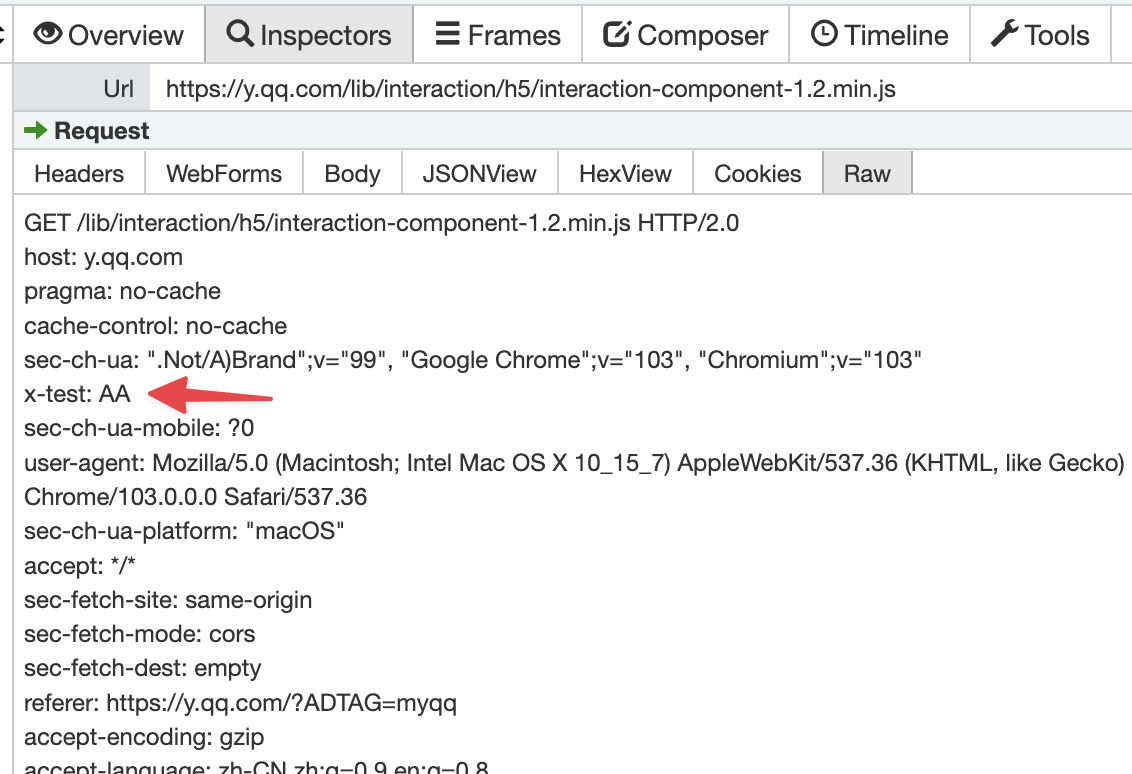
For HTTP/2 requests, packet capture shows that X-test is rewritten to lowercase x-test:
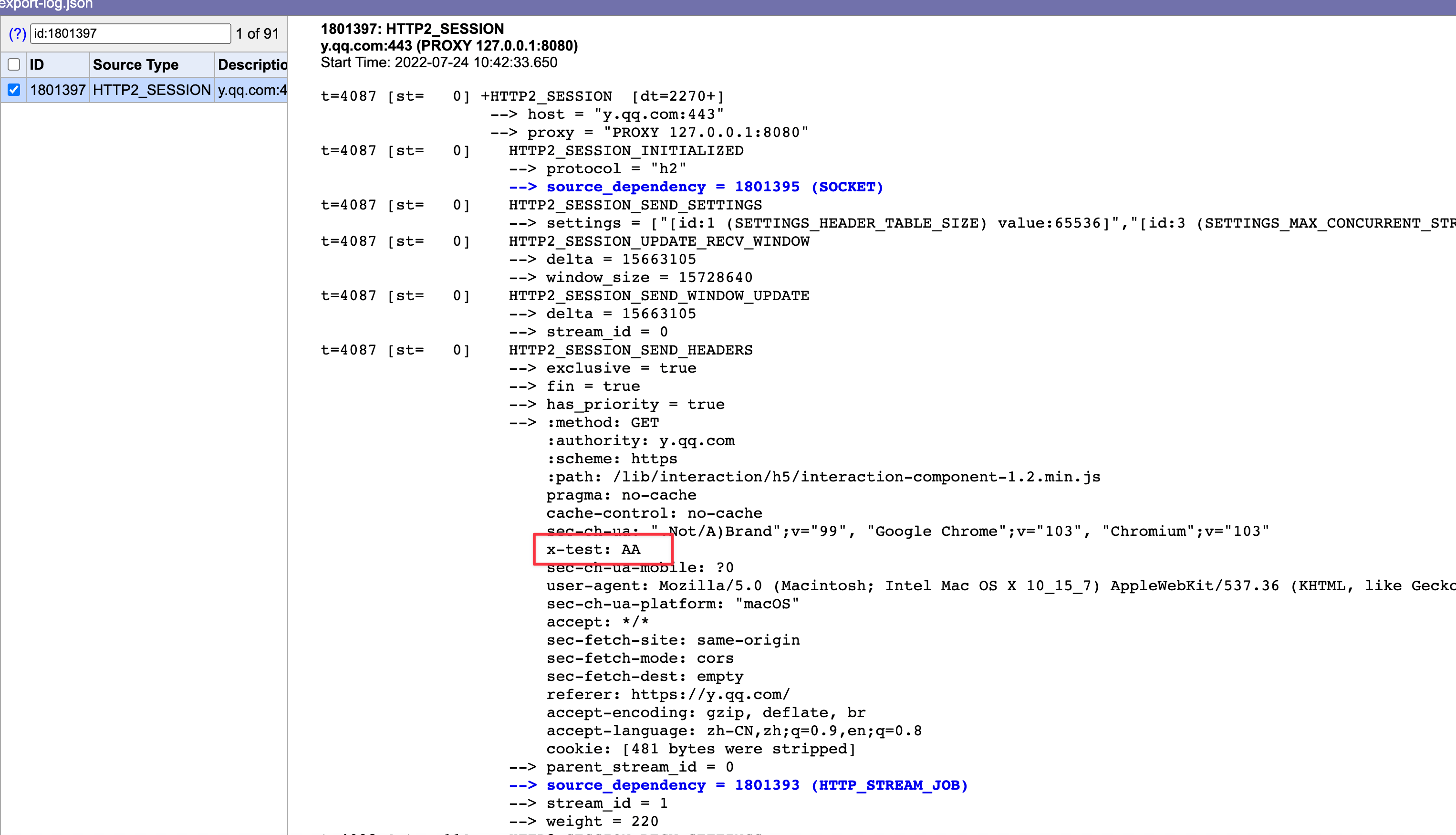
To be thorough, I also checked with Chrome’s built-in netlog-viewer — the header was indeed lowercased:
Note: The same result appears in Safari, but Safari’s DevTools display has case issues — Chrome’s DevTools doesn’t. This appears to be a Safari bug.
I looked into the Blink source for XMLHttpRequest but couldn’t find where exactly the lowercasing happens. The XHR standard (XMLHttpRequest Standard) doesn’t specify it either.
There was even a proposal to have XHR lowercase headers automatically (Should XHR store and send HTTP header names in lower case? · Issue #34 · whatwg/xhr), but it was rejected.
Testing against an HTTP/1.1 site:
var ajax = new XMLHttpRequest();
ajax.open("get", "http://www.cn1t.com/airing.js");
ajax.setRequestHeader("X-test", "AA");
ajax.send();
The header name is not lowercased here:
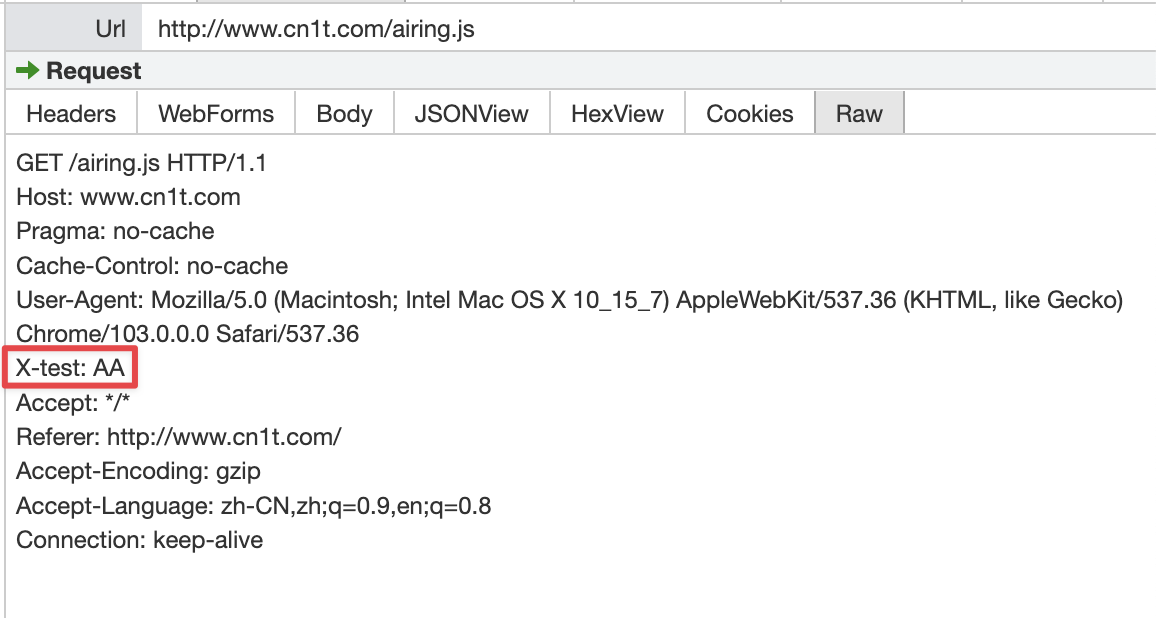
This tells us: lowercasing request headers isn’t done by XMLHttpRequest — it’s handled by the underlying network library.
PS. I spent quite a while debugging this and couldn’t find the exact spot where the lowercasing happens. If anyone knows, please leave a comment — I’d really appreciate it.
For response headers, it’s different. When you use getAllResponseHeaders on an XMLHttpRequest, Blink explicitly lowercases header names:
String XMLHttpRequest::getAllResponseHeaders() const {
  // ...
  for (const auto& header : headers) {
    string_builder.Append(header.first.LowerASCII());
    string_builder.Append(':');
    string_builder.Append(' ');
    string_builder.Append(header.second);
    string_builder.Append('\r');
    string_builder.Append('\n');
  }
  // ...
}
Additionally, when Chromium parses HTTP/2 response packets, any uppercase header field names cause the packet parse to fail:
absl::optional<ParsedHeaders> ConvertCBORValueToHeaders(
    const cbor::Value& headers_value) {
  // ...

  for (const auto& item : headers_value.GetMap()) {
    if (!item.first.is_bytestring() || !item.second.is_bytestring())
      return absl::nullopt;
    base::StringPiece name = item.first.GetBytestringAsString();
    base::StringPiece value = item.second.GetBytestringAsString();

    // If name contains any upper-case or non-ASCII characters, return an error.
    // This matches the requirement in Section 8.1.2 of [RFC7540].
    if (!base::IsStringASCII(name) ||
        std::any_of(name.begin(), name.end(), base::IsAsciiUpper<char>))
      return absl::nullopt;
// ...
  }

  return result;
}
Is the HTTP Method Case-Sensitive?
Per RFC 7230 — HTTP/1.1, Section 3.1.1:
The method token indicates the request method to be performed on the target resource. The request method is case-sensitive.
HTTP Methods are case-sensitive and must be uppercase.
That said, passing a lowercase method to XMLHttpRequest (e.g., ajax.open("get", "https://ursb.me")) actually works fine — Blink normalizes it to uppercase internally XMLHttpRequest.cpp - Chromium/blink:
void XMLHttpRequest::open(const AtomicString& method,
                          const KURL& url,
                          bool async,
                          ExceptionState& exception_state) {
  //...
  method_ = FetchUtils::NormalizeMethod(method);
  // ...
}
AtomicString FetchUtils::NormalizeMethod(const AtomicString& method) {
// https://fetch.spec.whatwg.org/#concept-method-normalize
// GET and POST first because they're most common
const char* const kMethods[] = {
"GET", "POST", "DELETE", "HEAD", "OPTIONS", "PUT",
};
for (auto* const known : kMethods) {
if (EqualIgnoringASCIICase(method, known)) {
return method == known ? method : known;
}
}
return method;
}Is the URL Case-Sensitive?
Per RFC 7230 — HTTP/1.1, Section 2.7.3:
The scheme and host are case-insensitive and normally provided in lowercase; all other components are compared in a case-sensitive manner.
The HTTP scheme (protocol) and host are case-insensitive. The path, query, and fragment are case-sensitive.
Chromium normalizes URLs via the kUrl class, which canonicalizes protocol and host to lowercase during parsing.
The interesting case is path. The spec says path is case-sensitive, but in practice it depends on the web server’s file system. IIS on Windows doesn’t distinguish case, because NTFS and FAT (Windows file systems) are case-insensitive by default (while preserving case). Similarly, Apache deployed on macOS (HFS) is case-insensitive by default.
A quick overview of major OS file systems:
- Windows (NTFS, FAT): case-insensitive by default, but case-preserving
- macOS (APFS, HFS+): case-insensitive by default, but case-preserving
- Linux (ext3/ext4): case-sensitive
Server configuration also matters. For example, https://en.wikipedia.org/wiki/Case_sensitivity and https://en.wikipedia.org/wiki/case_sensitivity point to the same article — but that doesn’t mean the server is case-insensitive, because https://en.wikipedia.org/wiki/CASE_SENSITIVITY returns 404.
Is the Cookie Case-Sensitive?
Short answer: yes, Cookie names are case-sensitive. The spec history is a bit bumpy though.
The early RFC 2109 actually said Cookie names were case-insensitive:
Attributes (names) (attr) are case-insensitive.
But RFC 2965 obsoleted RFC 2109:
This document reflects implementation experience with RFC 2109 and obsoletes it.
The current spec RFC 6265 doesn’t explicitly state whether Cookie names are case-sensitive. By default, this implies they are — and Chrome and Firefox both treat Cookie names as case-sensitive.
Is an E-Mail Address Case-Sensitive?
Per RFC 5321: SMTP, Section 2.3.11, the local part (before @) is interpreted solely by the destination host. The domain part follows RFC 1035:
“Name servers and resolvers must compare [domains] in a case-insensitive manner”
The domain part of an email address is case-insensitive. Whether the local part (username) is case-sensitive depends on the email service provider.
Are HTML5 Tags and Attribute Names Case-Sensitive?
Per HTML Living Standard, Section 13.1, HTML tags and attribute names are case-insensitive:
Many strings in the HTML syntax (e.g. the names of elements and their attributes) are case-insensitive, but only for characters in the ranges U+0041 to U+005A (LATIN CAPITAL LETTER A to LATIN CAPITAL LETTER Z) and U+0061 to U+007A (LATIN SMALL LETTER A to LATIN SMALL LETTER Z).
This means <!DOCTYPE html> and <!doctype html> are both valid.
One exception: data-* attributes must be lowercase. Per HTML Living Standard, Section 3.2.6.6:
A custom data attribute is an attribute in no namespace whose name starts with the string “
data-”, has at least one character after the hyphen, is XML-compatible, and contains no ASCII upper alphas.
Blink has correction logic — even if you write <div data-Name="airing"></div>, it normalizes it. But for compatibility, always use lowercase: data-name.
Is CSS Case-Sensitive?
All Selectors syntax is case-insensitive within the ASCII range (i.e. [a-z] and [A-Z] are equivalent), except for parts that are not under the control of Selectors. The case sensitivity of document language element names, attribute names, and attribute values in selectors depends on the document language.
CSS selector syntax is case-insensitive. Whether property names and values are case-sensitive depends on the document language — in XHTML DOCTYPE they’re case-sensitive; in HTML DOCTYPE they’re not.
Is Git Case-Sensitive for File Names?
Git ignores case differences in file names by default.
This can cause problems in practice:
- A developer on Linux (or macOS/Windows with a case-sensitive filesystem) might create a new file
rankItem.tsxwithout realizingRankItem.tsxalready exists, and successfully commit it. - Now the Git server has both
RankItem.tsxandrankItem.tsx. Developers on Windows or macOS (with the default case-insensitive filesystem) can’t properly pull both files.
The fix: disable Git’s case-ignoring behavior:
git config --global core.ignorecase falseWhen renaming a file by case on Windows or macOS, use git mv:
git mv --force rankItem.jsx RankItem.jsxWithout this, renaming readme.md to README.md won’t even appear in git status:
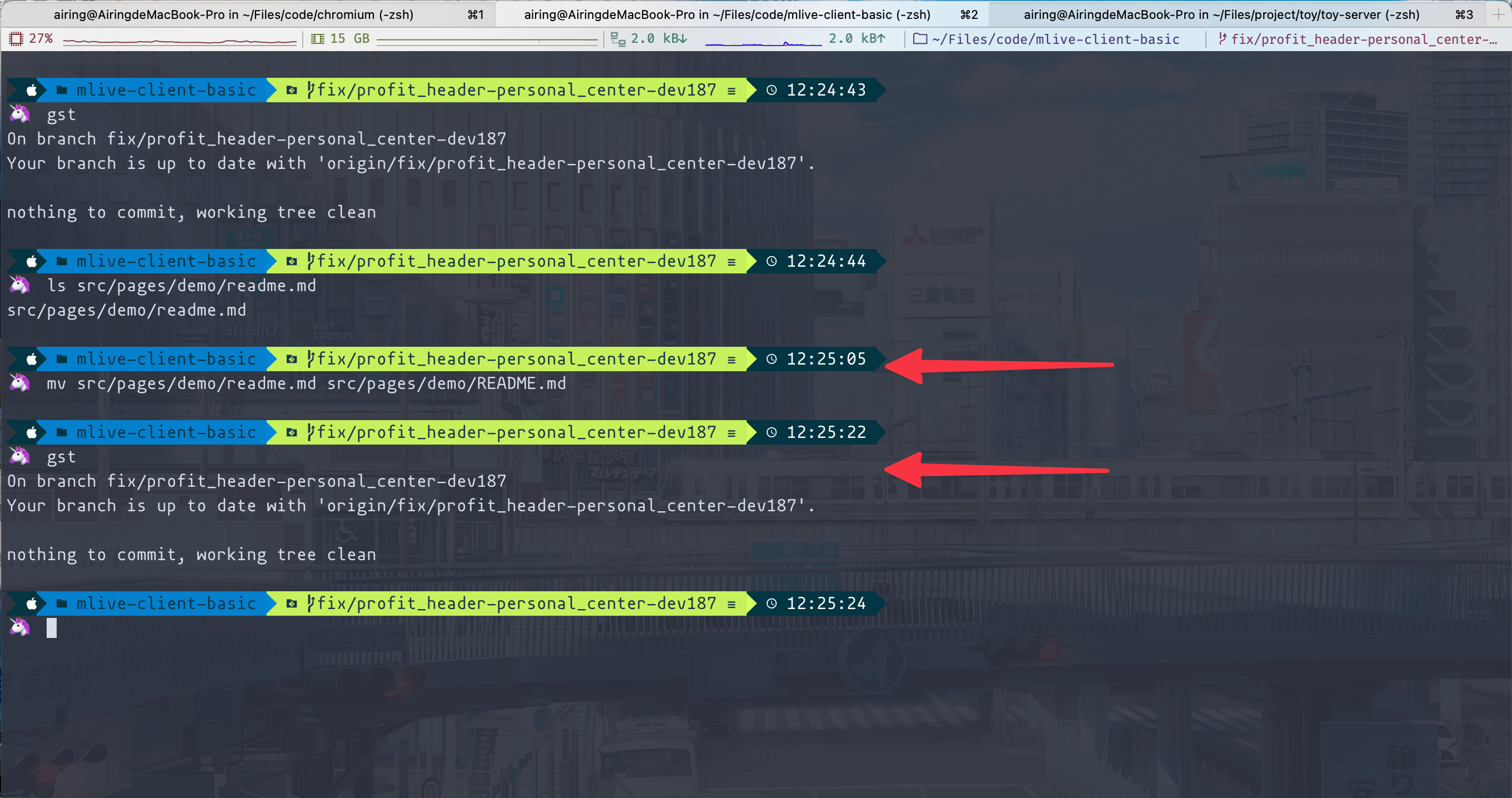
With git mv, it shows up correctly:
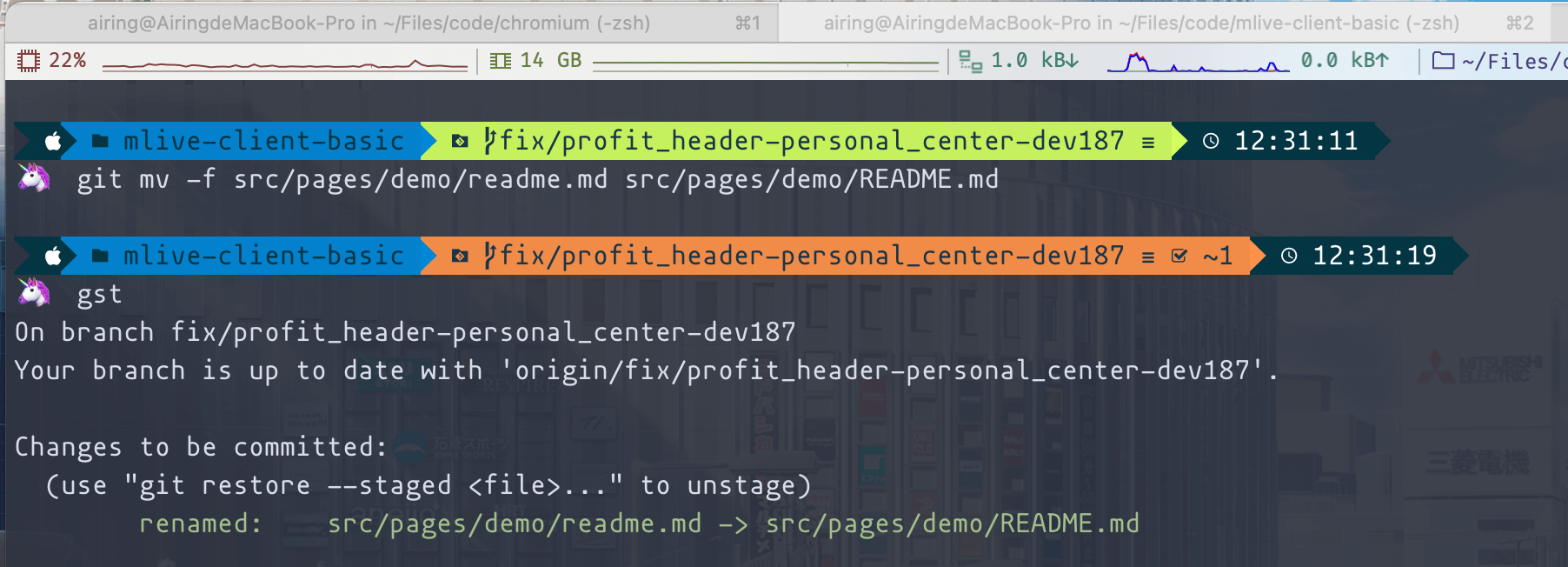
Strongly recommended: disable Git’s case-insensitive setting and always use git mv for case renames. If your environment allows it, you can also convert the volume to a case-sensitive filesystem on macOS or Windows.
Here’s a summary of all the case sensitivity rules we covered:
- HTTP Header keys are case-insensitive, but most frameworks normalize response header keys to lowercase. [RFC 7230]
- HTTP/2 requires lowercase headers due to header compression; browsers enforce this. [RFC 7540]
- HTTP Methods are case-sensitive and must be uppercase. [RFC 7230]
- URL protocol and host are case-insensitive; browsers normalize them to lowercase. [RFC 7230]
- URL path is case-sensitive per the spec, but in practice depends on the web server’s filesystem and configuration. [RFC 7230]
- URL query and fragment are case-sensitive. [RFC 7230]
- Cookie keys are case-sensitive, though the spec doesn’t explicitly say so. [RFC 6265]
- E-mail domain is case-insensitive. [RFC 1035]
- E-mail local part (username) case sensitivity depends on the provider. [RFC 5321]
- HTML5 tag names and most attribute keys are case-insensitive. [HTML Living Standard 13.1]
- HTML5
data-*attributes are case-sensitive. [HTML Living Standard 3.2.6.6] - CSS selector syntax is case-insensitive; property names and values depend on the document language. [CSS Selectors Level 3]
- Git ignores file name case by default.
- Windows (NTFS, FAT): case-insensitive, case-preserving.
- macOS (APFS, HFS+): case-insensitive, case-preserving.
- Linux (ext3/ext4): case-sensitive.
