Introduction
This article explores cross-platform framework technology — analyzing the technical goals and three evolutionary directions, then diving into the implementation details of custom-rendering cross-platform solutions built internally at major companies, including Kun, WebF, TDF, Weex 2.0, Waft, and MiniX. I’ll examine each framework’s characteristics and limitations, distill the key engineering principles, and close with some thoughts on where the space is headed.
Along the way, I’ll also touch on script engine selection trade-offs, the challenges each framework faces, how debuggers work, and the engineering thinking behind “one core, multiple ecosystems.”
Here’s the outline:
- Technical goals of cross-platform frameworks (skipped)
- Technical directions
- Technical deep-dives
- Key technical considerations
- Development trends (skipped)
Note 1: This post is the written summary of an offline talk. It omits the background sections (sections 1 and 5) and some extended technical details (parts of sections 3–4), keeping only the core content.
Note 2: The material here comes from publicly available GMTC conference talks, public WeChat official accounts from various companies, open-source framework code, and my own past presentations. Any internal materials have been desensitized.
Technical Directions
I’ve grouped cross-platform frameworks into four broad directions.
Direction 1: Enhanced WebView
WebView enhancement leans frontend — the upper layer still uses web technologies, but the client-side adds capabilities on top. Examples include:
- Hybrid frameworks like Ionic and Cordova
- Mini-programs built on WebView
- Client-side preloading solutions like Sonic
- Offline package solutions for web pages in apps
These frameworks share a few characteristics:
- Render using WebView, but supplement it with native capabilities
- Development ecosystem is web-based (mini-programs technically qualify too)
- Various strategies to improve web UX
Direction 2: DSL-based Native Enhancement
DSL-based native enhancement leans toward the client side while borrowing from web design. The development model is native, but the framework architecture draws inspiration from WebView patterns. These frameworks typically define a custom DSL for cross-platform support and dynamic updates.
Examples: DinamicX (Taobao accessibility framework), MTFlexbox (Meituan), and Alibaba’s Tangram.
Browse their docs and you’ll see a strong resemblance to React Native — the key difference is that developers use the DSL to wire in components.
Direction 3: Code Sharing
Code sharing is a “big terminal” approach. The best-known implementation is KMM (Kotlin Multiplatform Mobile), which uses the K2 compiler to compile Kotlin source to native output for each platform. Concretely, Kotlin’s compiler frontend generates FIR (with semantic information), which backend compilers for each platform (JVM, LLVM, etc.) then optimize and emit as platform-specific executables.
KMM’s project structure is straightforward — a shared module and platform-specific shell apps (Android/iOS).
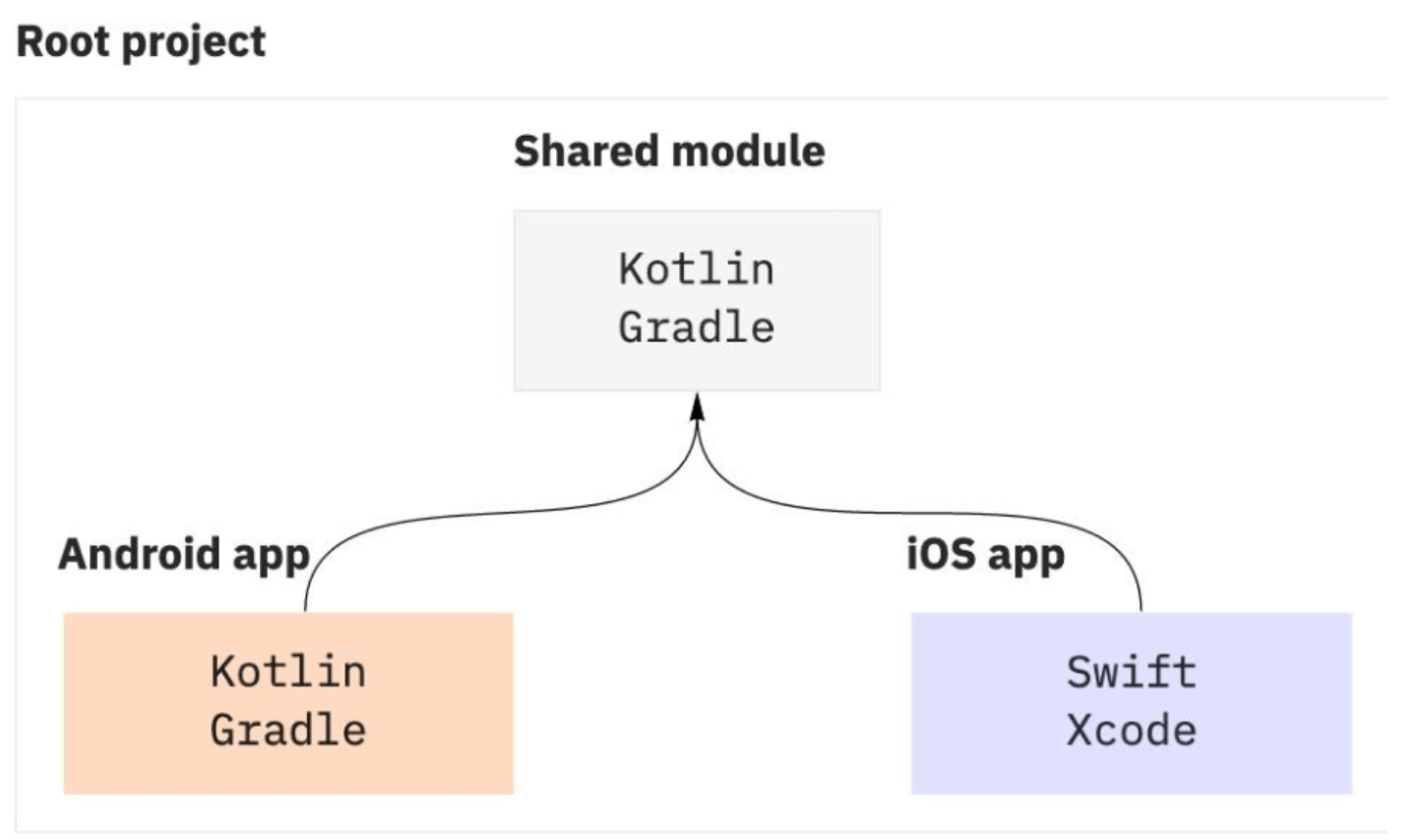
At the moment, the iOS code generation path doesn’t handle multi-threading especially well, which means teams often need to do extra work to optimize for it.
Direction 4: GPL-based Native Enhancement
I think of GPL-based native enhancement as the “big terminal” synthesis. The concept traces back through history: the PC era had .NET, JVM, and Qt for desktop development; the mobile era had native client developers chasing dynamism while frontend cross-platform developers chased performance. These two paths eventually converged into today’s cross-platform frameworks — mini-programs, Flutter, DSL frameworks, and WASM are all products of this convergence.
Direction 4 has several categories:
- Native rendering components: React Native / Hippy 1.0 / Weex 1.0 and similar.
- Self-rendering engine: Flutter — worth putting in its own tier.
- Flutter-based self-rendering frameworks: Many exist (I once catalogued 20+), including WebF (formerly Kraken), Kun, FMP, and Skyline-based mini-programs.
- System graphics library-based self-rendering frameworks (Skia / Vulkan / Metal / OpenGL): TDF, Hippy 3.0, Weex 2.0, Waft, etc. Flutter technically belongs here too.
The first three directions and the first two categories of Direction 4 are open-source and well-documented. This post focuses on the latter two categories of Direction 4.
Technical Deep-Dives
I’ve selected a few representative frameworks:
- Kun
- WebF
- Weex 2.0
- TDF (desensitized, skipped)
- Waft
- MiniX (skipped)
I picked these because they represent distinct technical approaches in their respective niches — worth studying for their application development model, script engine choices, and rendering engine decisions.
Kun
Kun is a cross-platform framework built by Xianyu (Alibaba’s second-hand goods app) on top of Flutter. It’s not open-source, and the only publicly available writeups are three articles on Xianyu’s WeChat account. The architecture is fairly straightforward — even without the source code you can piece together a reasonable picture.
The core idea: Kun runs a JS Runtime on top of Flutter. Developers write frontend-style pages; a JS interpreter acts as a glue layer, translating source to Flutter Widgets, which are then passed to Flutter Engine for rendering.
For the JS engine, they use QuickJS — likely Alibaba’s internal QKing (a QuickJS fork). The debugger supports CDP, and tests are based on Flutter Golden tests.
For CSS parsing, they use Yoga as a polyfill, converting styles to CSS-in-JS. The parsing module itself borrows from Kraken’s CSSLib. Inline styles are passed from the JS side to Dart via FFI, then parsed into Flutter Widgets.
Since CSS’s box model and document flow are fundamentally different from Flutter Widget’s styling model, they use a Widget-compositing approach where each Widget layer handles a specific style property. Here’s what a single div element looks like after composition:
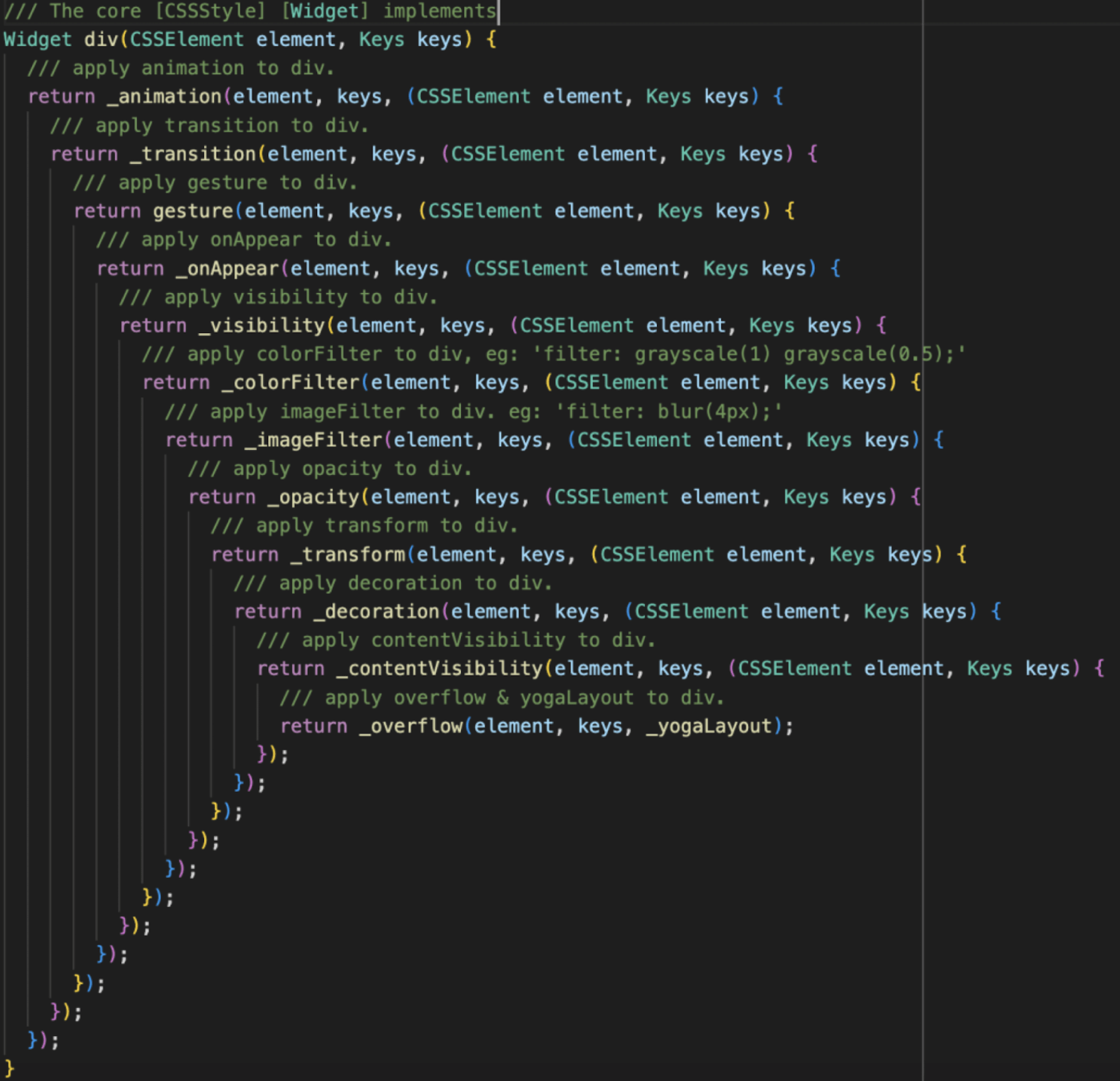
Key characteristics:
- No full W3C standard support (and this is inherently impossible — for instance, CSS-in-JS can’t implement pseudo-classes). Supports subsets of: HTML tags, CSS properties, Web APIs.
- Provides custom Element components implemented in Dart; business teams can implement their own custom Elements on the Dart side.
- Component rendering uses Widget composition.
References:
- The New Species in the Big Terminal Domain — KUN
- Third-Generation Terminal Container KUN’s First Big Test
- Exploring KUN’s Loading Performance and Enhanced Experience on Double Eleven
WebF
WebF was formerly Alibaba’s Kraken. When that team disbanded, part of the codebase went to Kun; the remaining engineers formed the open-source openwebf org, renamed the project WebF, and continued development.
Here’s WebF’s architecture:
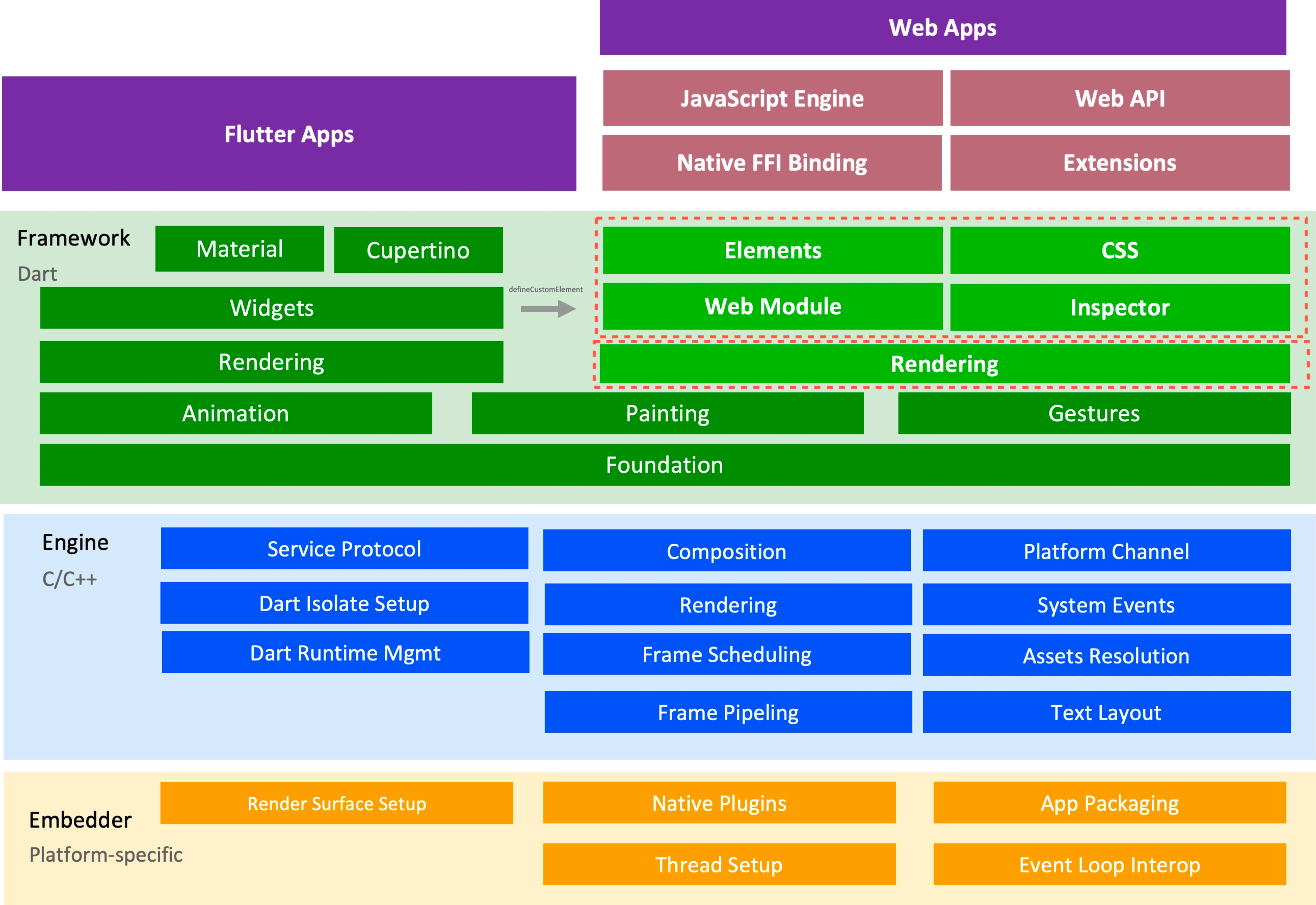
Unlike Kun, WebF not only provides JSBinding but also does significant work on the Dart side — enriching RenderObject’s capabilities to align with W3C standards. CSS is implemented in the Dart layer; WebAPIs are implemented in C++, both aligned with W3C specs.
The script engine is still QuickJS, but with notable optimizations worth studying.
Comparing Kun and WebF reveals two different philosophies for handling CSS.
Kun’s approach has several issues:
- Two Layout passes in a single render pipeline — completely unnecessary overhead. Layout is called very frequently, and running it twice significantly impacts performance.
- Dart FFI can’t handle the volume of style updates. Style changes generate large amounts of data that hit FFI’s throughput limits.
- Inline styles are awkward to work with, and many CSS properties simply can’t be expressed this way.
There are two good solutions for CSS:
- Implement CSS in the Dart layer, where style updates go through RenderObject’s Layout directly — no FFI needed.
- Implement DOM and CSS entirely in C++, cutting Dart out of the loop.
WebF is Solution 1; Weex 2.0 and TDF go with Solution 2.
Solution 1 has its own challenge: introducing CSS makes the RenderObject Tree hard to manage. There are two approaches here:
- Keep RenderObject thin: use Flutter Widgets as atomic rendering units, compose them to implement complex styles. This is what Kun does.
- Make RenderObject thick: embed extensive layout and rendering capabilities directly, letting the style sheet drive RenderObject rendering.
Making RenderObject “thick” is clearly the better approach — the alternative is extremely high complexity (you can see this in Kun’s deeply nested Widget chains). Every style rule requires reasoning through layer after layer, which destroys maintainability.
I’m bullish on WebF’s approach, and it’s the only one of these frameworks that’s fully open-source. If you’re interested, join the TSC and help build it.
References:
- https://github.com/openwebf/webf
- Shenghuai: “How WebF Achieves High-Performance Flutter + Web Integration” (2022 QCon)
Weex 2.0
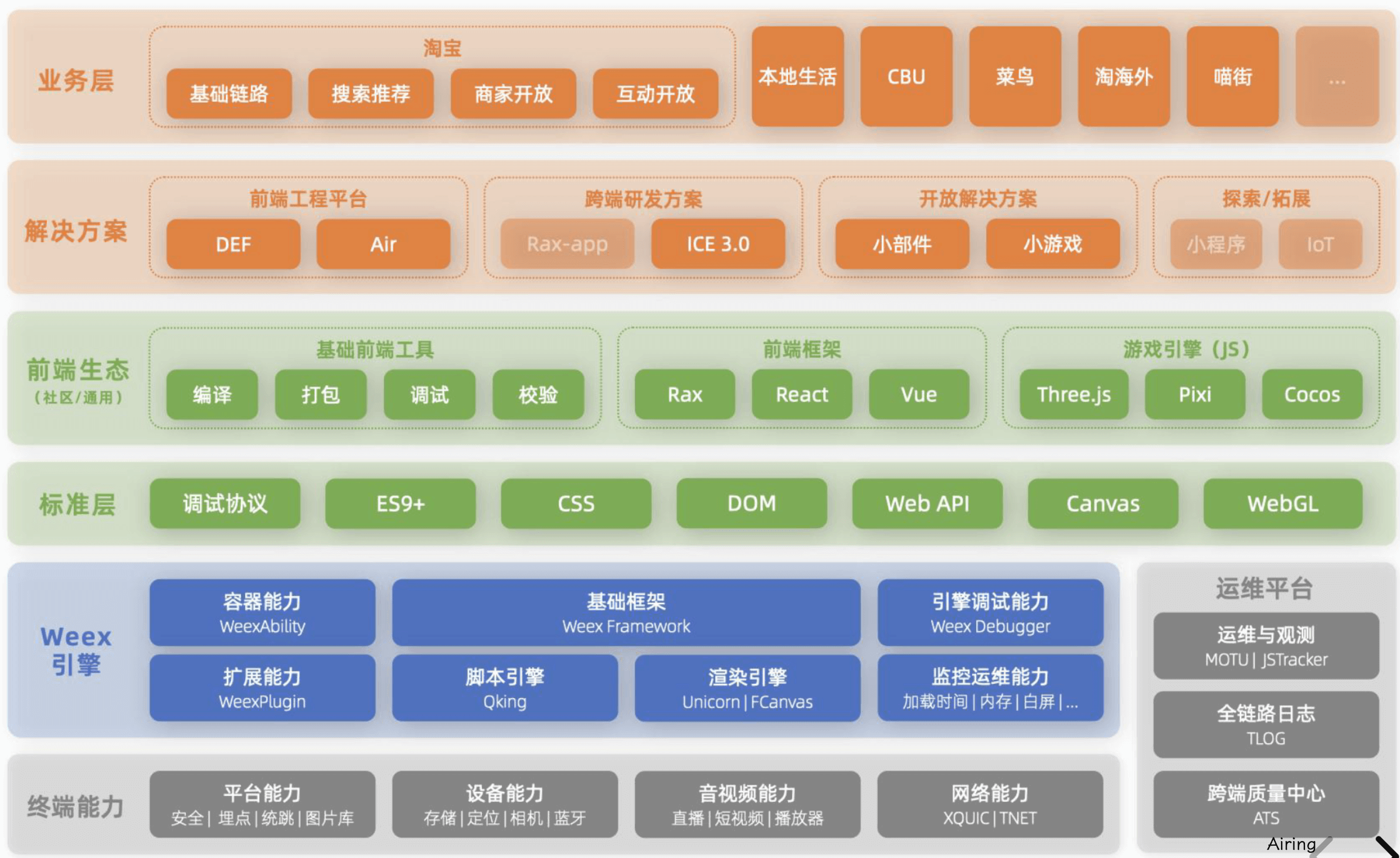
Weex 2.0 is Alibaba’s internal cross-platform solution, and it has largely achieved a “one core, multiple ecosystems” architecture internally. The technical architecture was completely rebuilt from scratch — the team explored many paths along the way. Based on public presentations, the overall solution is mature and comprehensive, representing a substantial engineering effort.
Here’s Weex 2.0’s architecture:
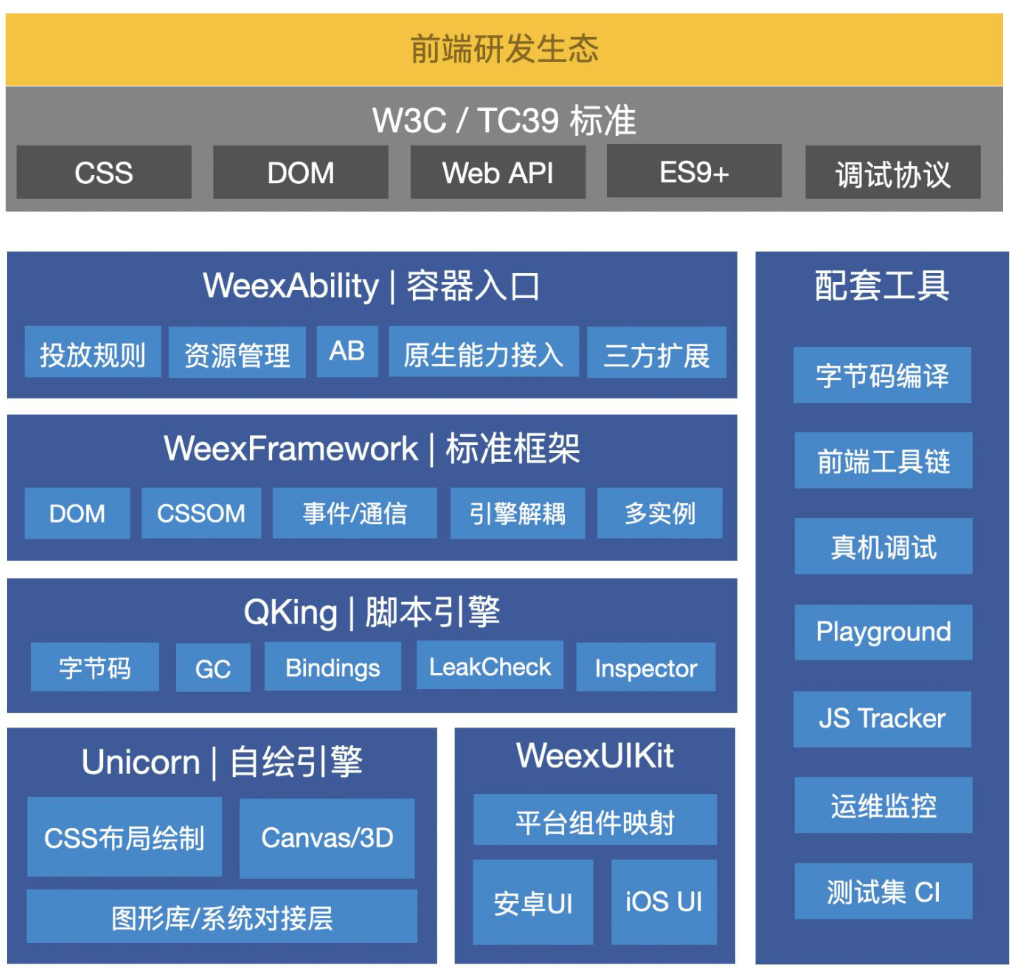
Key components:
- WeexAbility: Container and capability extension — URL interception, caching, basic APIs, third-party extension support.
- WeexFramework: Common foundational layer — encapsulates page instances, implements DOM/CSSOM/WebAPI standards, decouples script and rendering engines.
- QKing: Script engine — a heavily customized fork of QuickJS.
- Unicorn: Self-built rendering engine — implements full CSS support including node construction, animation, gesture handling, layout, painting, compositing, rasterization, and the full rendering pipeline. Cross-platform.
- WeexUIKit: Native UI rendering engine — wraps native components.
Like previous frameworks, Weex 2.0 outputs bytecode from jsbundle source. But there are significant improvements: SSA optimizations in the compiler, a heavily optimized JS runtime, and the full pipeline is implemented in C++ — no extra communication overhead, no redundant abstractions, a shorter critical path. The custom Unicorn engine delivers streamlined layout algorithms, fine-grained gesture and animation control, and direct access to the system graphics layer. The entire solution is unrelated to 1.0, and it systematically resolves 1.0’s issues: cross-language communication problems, rendering inconsistencies between platforms, layout algorithm deficiencies, and poor script execution performance.
By building on Weex 2.0, Alibaba moved away from siloed “stovepipe” solutions. A shared multi-ecosystem kernel pushes standardization of foundational capabilities while still supporting differentiated business scenarios:
References:
- Menliu: “Architecture and Practice of Taobao’s Next-Generation Self-Rendering Engine” (2023 GMTC)
Note: Tencent’s TDF is working toward similar goals — desensitized and not covered here.
Waft
Waft (WebAssembly Framework for Things) is a self-rendering framework built by the Tmall Genie team using WebAssembly Runtime and Skia. It’s not open-source. While it currently only supports AIoT scenarios rather than general cross-platform use, its technical approach is inherently generalizable — worth examining for its ideas.
Tmall Genie went through several attempts in AIoT. They started with Android apps, but memory constraints (only a few hundred MB) caused performance problems. They tried cloud-rendered apps — decent experience but server costs were prohibitive. So they explored on-device rendering, leading to Waft.
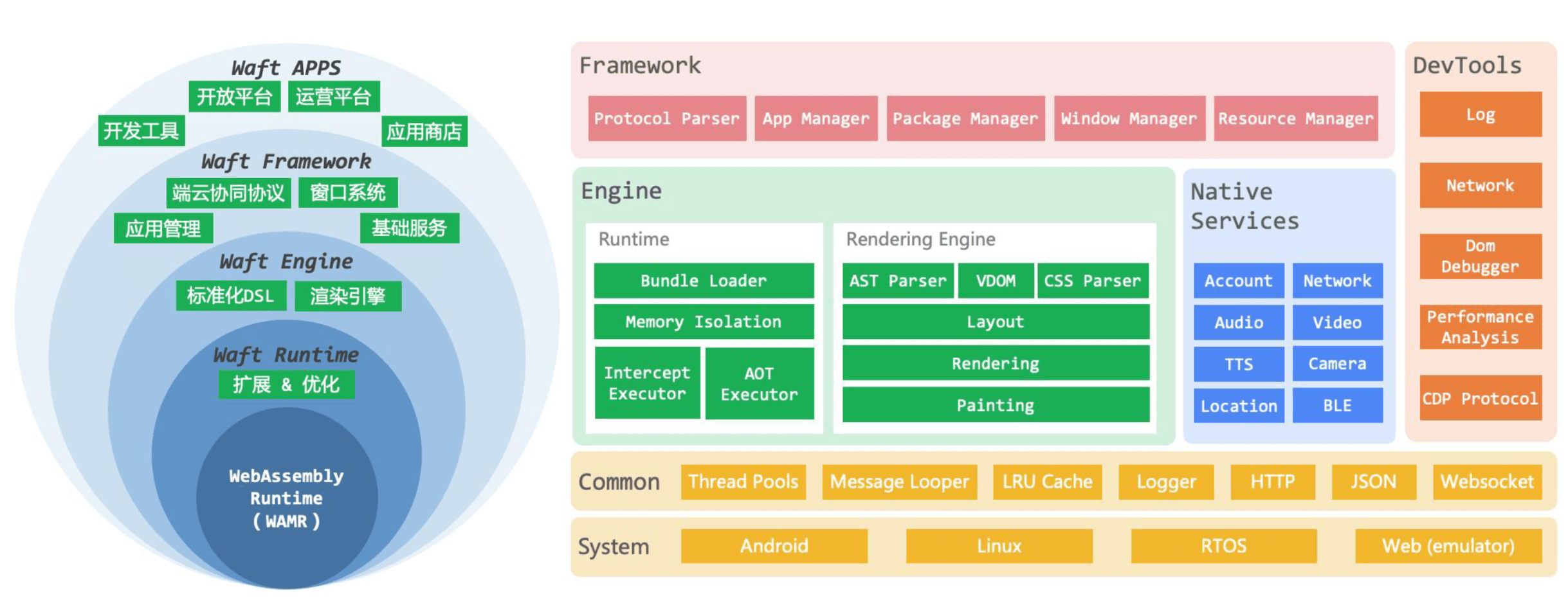
Here’s Waft’s architecture:
They also redesigned the loading and rendering pipelines:
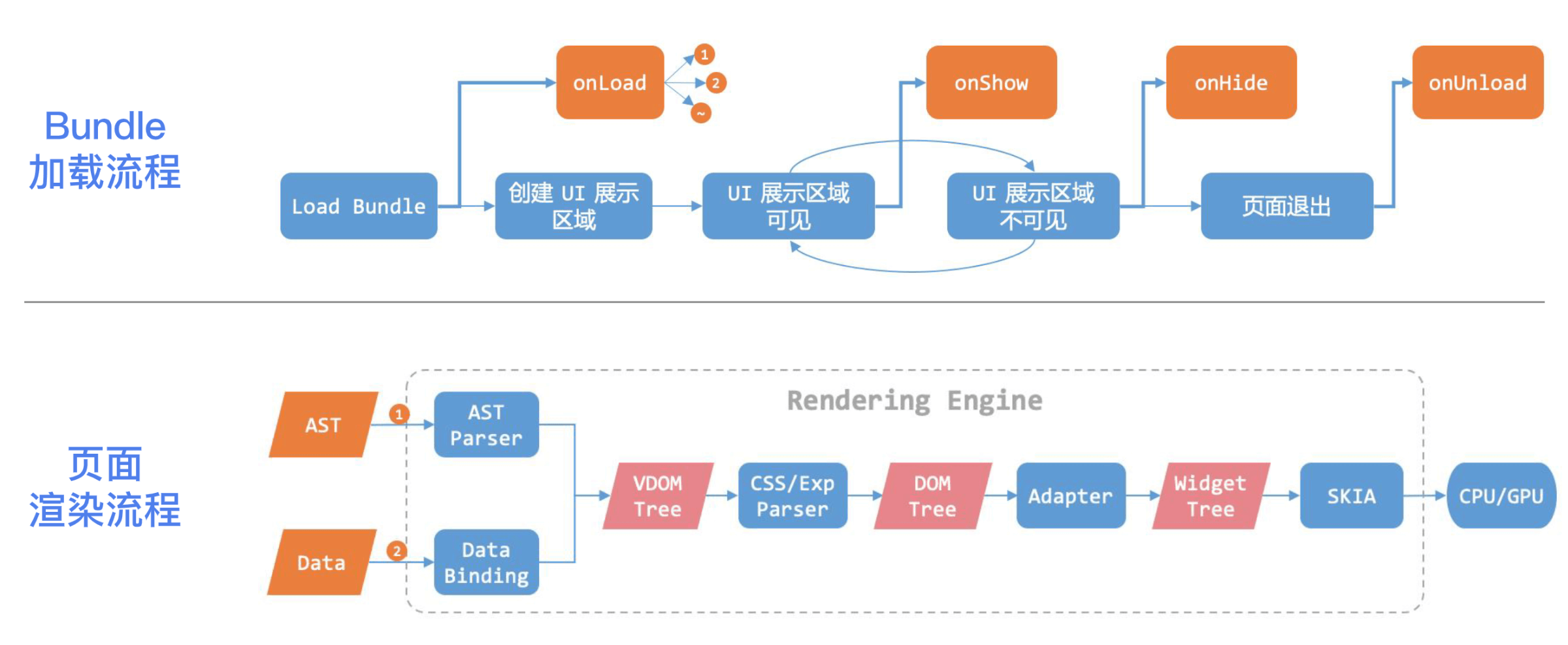
The scope of work here is considerable, and it doesn’t align well with web standards or the frontend ecosystem.
For the script engine, they chose WebAssembly and provided this comparison chart:
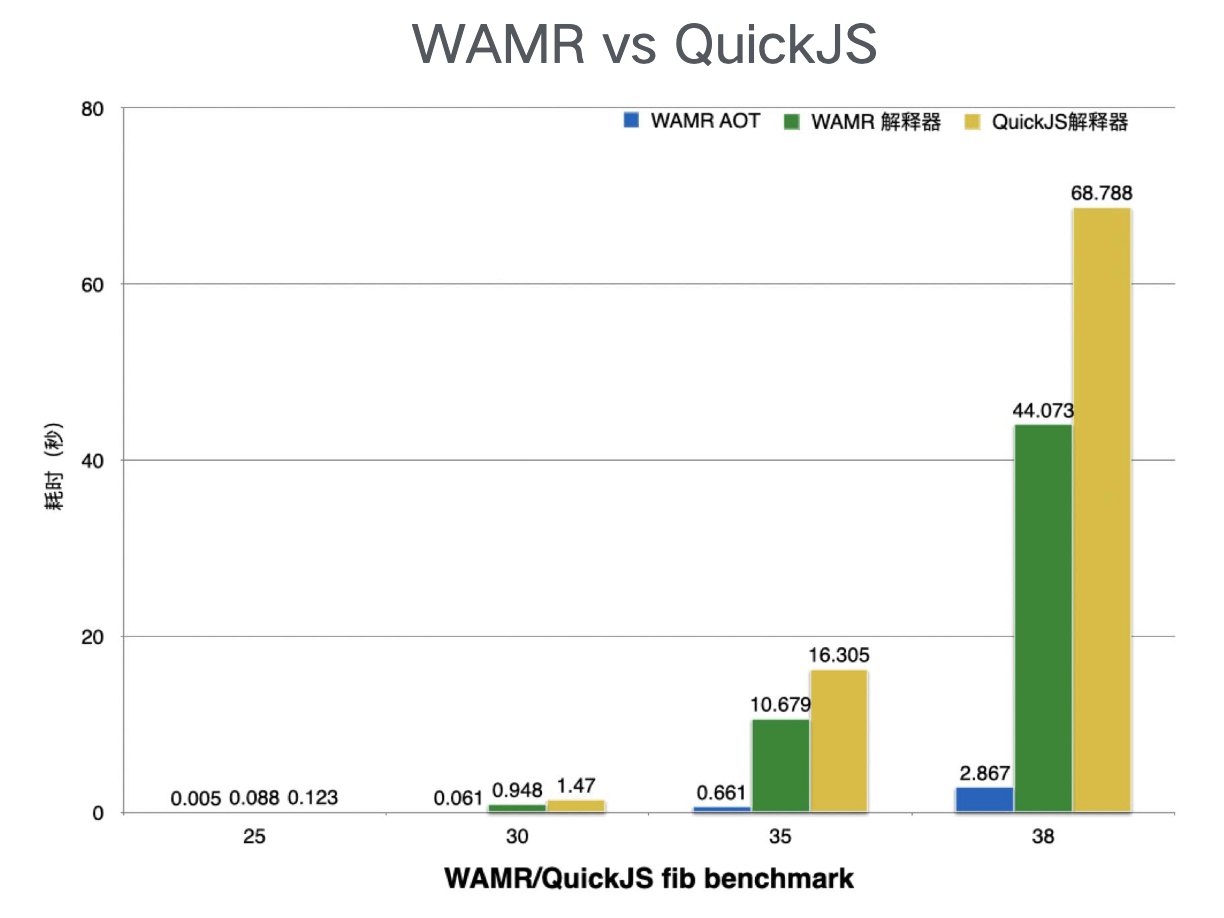
I have some reservations about this choice (they may have internal considerations I’m not aware of):
- The Fibonacci benchmark is too simple — it doesn’t showcase JS engine strengths in realistic scenarios.
- Comparing AOT against interpreted execution is unfair by definition.
- The QuickJS used appears to be the original version, which has significant headroom for optimization.
- No comparison against JIT-capable engines like V8 or JavaScriptCore.
- No clarification on which WASM implementation was used — different runtimes have very different performance characteristics, some favoring interpreted execution, others AOT/JIT.
Waft itself has known limitations:
- Only supports a subset of CSS
- Incomplete W3C standard support (DOM Element, WebAPI)
- Package size may be large (unclear at this point)
These limitations also define Waft’s current applicability — it’s best suited for simple IoT pages.
References:
- Nie Xinxin: “Waft: An AIoT Application Development Framework Based on WebAssembly and Skia” (2023 GMTC)
Key Technical Considerations
Dynamism
Surveying these frameworks, their use cases include:
- Dynamic content delivery
- IoT
- Desktop
- In-vehicle
- One core, multiple ecosystems
There’s a saying: “A cross-platform framework without dynamic capabilities has no soul.” And it’s worth noting that dynamic update frameworks and cross-platform frameworks actually overlap substantially. I’ve previously summarized five approaches to dynamism:
- WebView-based enhancement
- DSL-based native enhancement
- GPL-based native enhancement
- Plugin-based (Android)
- ObjC runtime dynamism (iOS)
I made a diagram for this:
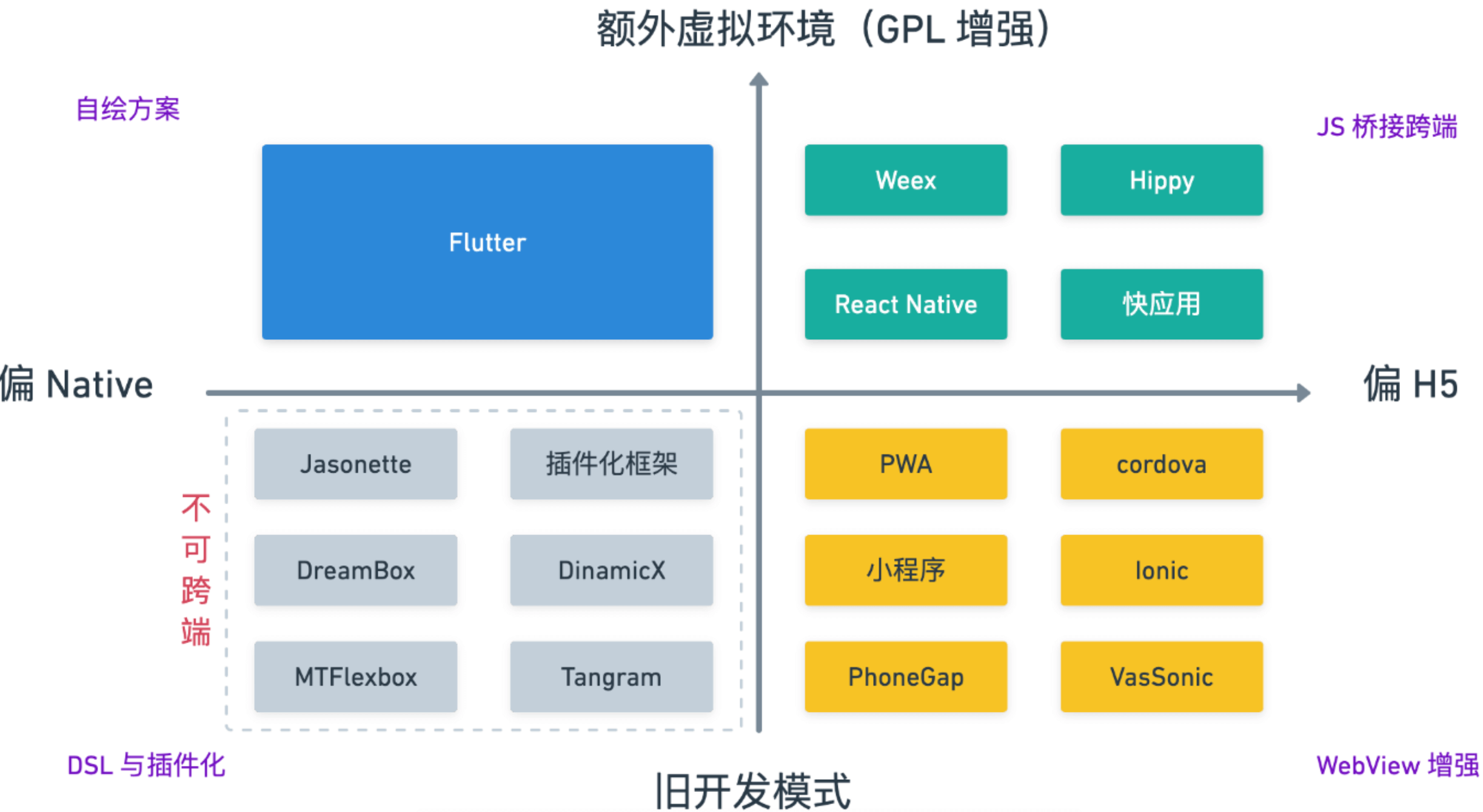
Note: This diagram is from an earlier time — the top-left quadrant should now say “Flutter and other self-rendering frameworks.”
The core requirement for all of these is loading and executing code at runtime. Notice that the first three dynamic update approaches map exactly to the three cross-platform technical directions covered earlier.
The key technical considerations I see:
- Script engine
- Rendering engine
- Debugger
- Engineering tooling
Let me go through each.
Script Engine
Three high-level choices:
- JS engine: Used as a glue layer, doesn’t need JIT for most scenarios.
- Dart VM: Chosen when Flutter Engine is the rendering foundation.
- WASM: Requires designing a DSL and implementing a rendering engine from scratch.
If you go the JS engine route, more specific choices:
- Dual-engine approach: Use each platform’s native engine — V8 (via j2v8) on Android, JSCore on iOS (zero binary size increment). However, JSCore on iOS can’t enable JIT directly.
- Hermes: Meta’s JS engine, designed specifically for Hybrid UI systems like React Native. Works out of the box.
- QuickJS: Written by Fabrice Bellard, extremely small footprint, solid performance.
- Custom JS engine: In practice, almost everyone in the industry builds on a QuickJS fork.
Known issues with QuickJS today:
- No JIT — implement as needed. JIT improves execution speed by an order of magnitude, but as a glue language the priority is different. JIT also increases cold-start time, memory footprint, and binary size — and doesn’t work on iOS.
- Manual GC — hard to manage and maintain, room for improvement.
- Missing line number tracking.
- Missing debugger support — some open-source plugins address this.
- No code cache.
- No inline cache.
- No memory leak detection.
- Bytecode has significant optimization headroom.
Rendering Engine
Two main approaches:
- Based on Flutter Engine
- Based on system graphics libraries: Skia / OpenGL / Metal / Vulkan
Regardless of choice, the overarching goal is a lean pipeline with synchronous rasterization.
Debugger
A debugger lets you pause JavaScript runtime execution and inspect internal state in real time — an essential tool for any framework. The major debugging protocols (all the frameworks above implement at least one):
- CDP: Chrome DevTools Protocol
- DAP: Debug Adapter Protocol
- Custom protocol: WeChat mini-programs used a custom protocol in their early days
Engineering Tooling
Engineering tooling should at minimum cover:
- Resource loading strategies
- Degradation/fallback handling
- Version management
- Development workflow
The Kant framework we built for QQ Music had a detailed design and implementation in this area — worth a separate post.
Summary
Common problems in self-rendering frameworks and how to address them:
| Problem | Solution |
|---|---|
| Poor developer experience | Use frontend ecosystem with JS Runtime; provide a debugger; support language services in IDE |
| Incomplete CSS | Align with standards; if CSS is in Dart, make RenderObject thick |
| Style inconsistencies with H5 | Build comprehensive test cases, validate with WPT |
| Android/iOS inconsistencies | Leverage existing resources, e.g. build on Flutter |
| Too few components, poor ecosystem | Align with W3C standards as fully as possible |
| Slow JS execution | Build or heavily optimize the JS engine |
| Non-standard behavior, can’t reuse community libraries | Align with W3C standards as fully as possible |
Lessons worth taking away:
- Standards first
- Invest in documentation
- Minimize custom work — reuse existing resources wisely
- Developer experience matters deeply
- Pay attention to low-end device performance
References and Further Reading
- Slide deck (desensitized): https://weekly.ursb.me/slide/cross-end/
- Menliu: “Architecture and Practice of Taobao’s Next-Generation Self-Rendering Engine” (2023 GMTC)
- Nie Xinxin: “Waft: An AIoT Application Development Framework Based on WebAssembly and Skia” (2023 GMTC)
- Shenghuai: “How WebF Achieves High-Performance Flutter + Web Integration” (2022 QCon)
- Jifeng: “KUN — A New Species in the Big Terminal Domain”
- openwebf/WebF
- Airing: “Kant in QQ Music” (unpublished)
- Airing: “Flutter Dynamic Update Solutions” (unpublished)
