1. Introduction
Flutter Boost is a Flutter hybrid development framework built by the Xianyu (Idle Fish) team. For background on the project, see their post: Getting Started with Flutter Hybrid Development Using FlutterBoost.
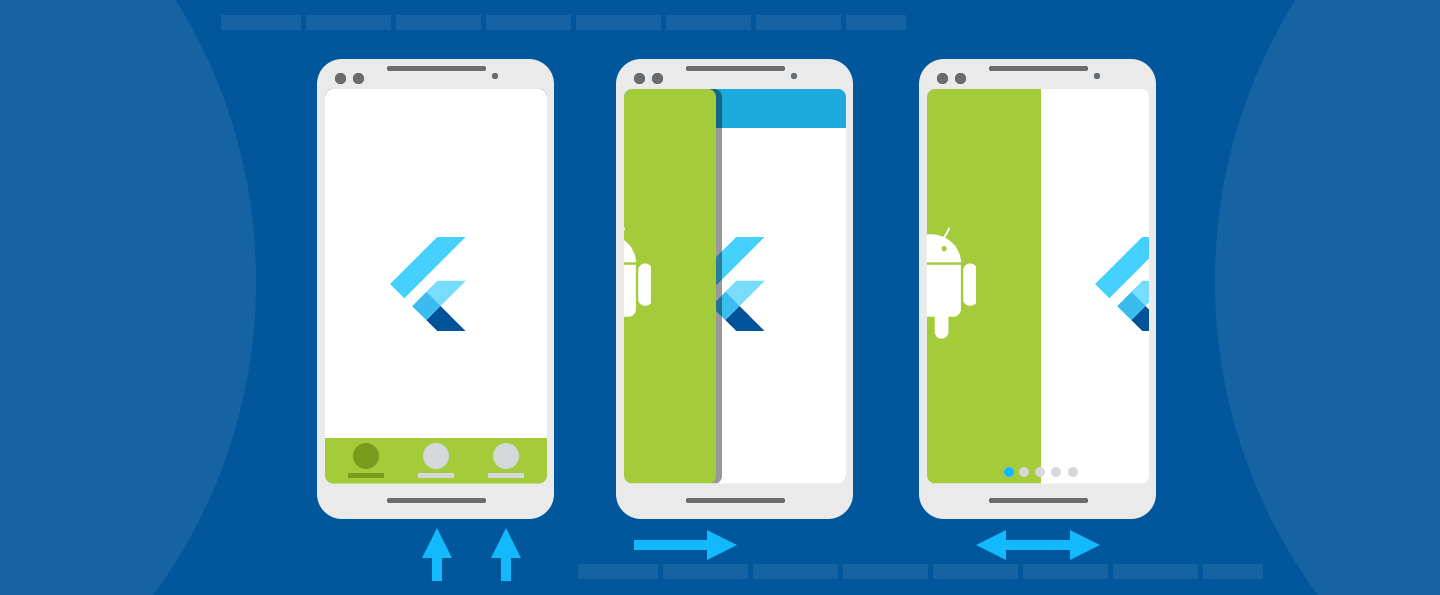
The article explains the practical issues that arise with multiple Flutter engines, which led Xianyu to choose a shared single-engine approach. Flutter Boost’s key features:
- Reusable, general-purpose hybrid solution
- Supports more complex hybrid modes, such as bottom tab navigation
- Non-invasive: no longer requires modifying Flutter internals
- Unified page lifecycle support
- Clear and consistent design concepts
Flutter Boost implements the shared-engine model through a core idea: Native containers (Containers) drive Flutter page containers through message passing, keeping the two in sync. Simply put, Xianyu wanted to make Flutter containers feel like browser tabs — you provide a URL-like page name, and the container manages the rendering. On the native side, all you need to do is initialize a container and set the corresponding page identifier.
Since I couldn’t find integration documentation or tutorials online, I spent some time digging into it and wrote this up for reference. Due to length constraints, this post only covers Android integration and source code analysis. iOS will be addressed in a follow-up if time permits.
Note: This post integrates Flutter Boost version 1.12.13, corresponding to Flutter SDK version 1.12.13-hotfixes — the latest available at time of writing. Integration patterns may change in future versions, so keep the version in mind when referencing this post.
2. Integration
2.1 Create a Flutter Module
Before starting, make sure your project directory is structured like this:
--- flutter_hybrid
--- flutter_module
--- FlutterHybridAndroid
--- FlutterHybridiOS
The iOS and Android projects should be at the same level as flutter_module. This keeps things organized and ensures path consistency throughout the integration.
Create the Flutter Module:
cd flutter_hybrid
flutter create -t module flutter_module
If you need AndroidX support, add the --androidx flag:
flutter create --androidx -t module flutter_moduleNote: If dependency downloads are slow, switch to a China mirror:
export PUB_HOSTED_URL=https://pub.flutter-io.cn
export FLUTTER_STORAGE_BASE_URL=https://storage.flutter-io.cn
You can also create a Flutter Module visually in Android Studio 3.6.1+ (with the Flutter and Dart plugins installed). See the official docs for details. I recommend the CLI approach since it’s more universal.
2.2 Integrate the Flutter Module
There are two ways to integrate the Flutter Module into the Native project:
- Source dependency
- AAR dependency
2.2.1 Source Dependency
Source dependency makes development and debugging easier. In your Android project’s settings.gradle, add:
include ':app'                                     // already exists

setBinding(new Binding([gradle: this]))
evaluate(new File(
  settingsDir.parentFile,
  'flutter_module/.android/include_flutter.groovy'
))
Then in app/build.gradle, add the :flutter dependency:
dependencies {
  implementation project(':flutter')
}
Also in app/build.gradle, specify Java 8 compatibility, otherwise you’ll hit compile errors:
compileOptions {
  sourceCompatibility 1.8
  targetCompatibility 1.8
}
Run a Gradle sync to download dependencies. If integration succeeds, you’ll see the flutter_module folder appear at the same level as your project in the sidebar.
2.2.2 AAR Dependency
If you need to build remotely on a machine without a Flutter environment, or want a quicker way for third parties to integrate, you can package Flutter as an AAR:
cd .android/
./gradlew flutter:assembleDebug
The resulting AAR includes the Flutter SDK code, so no Flutter environment is needed to use it.
2.3 Add Flutter Boost Dependency
In your Flutter Module’s pubspec.yaml, add the flutter-boost dependency under dev_dependencies:
dev_dependencies:
  flutter_boost:
     git:
        url: 'https://github.com/alibaba/flutter_boost.git'
        ref: '1.12.13'
The above supports AndroidX. For the support library version, use a different branch:
flutter_boost:
    git:
        url: 'https://github.com/alibaba/flutter_boost.git'
        ref: 'task/task_v1.12.13_support_hotfixes'
Install the dependency from the flutter_module directory:
flutter packages getIn the Android project’s app/build.gradle, add the :flutter_boost dependency:
dependencies {
    ...
    implementation project(':flutter')
    implementation project(':flutter_boost')
}
Since Flutter Boost is integrated as a Flutter Plugin, add the following to the top of app/build.gradle:
def localProperties = new Properties()
def localPropertiesFile = rootProject.file('local.properties')
if (localPropertiesFile.exists()) {
    localPropertiesFile.withReader('UTF-8') { reader ->
        localProperties.load(reader)
    }
}

def flutterRoot = localProperties.getProperty('flutter.sdk')
if (flutterRoot == null) {
    throw new GradleException("Flutter SDK not found. Define location with flutter.sdk in the local.properties file.")
}

def flutterVersionCode = localProperties.getProperty('flutter.versionCode')
if (flutterVersionCode == null) {
    flutterVersionCode = '1'
}

def flutterVersionName = localProperties.getProperty('flutter.versionName')
if (flutterVersionName == null) {
    flutterVersionName = '1.0'
}
Create (or update) local.properties in the Android project root to point to your local Flutter SDK:
flutter.sdk = /Users/airing/flutterFinally, add the following to the project-level settings.gradle to pull in the Flutter plugins:
def flutterProjectRoot = rootProject.projectDir.parentFile.toPath()

def plugins = new Properties()
def pluginsFile = new File(flutterProjectRoot.toFile(), '.flutter-plugins')
if (pluginsFile.exists()) {
    pluginsFile.withReader('UTF-8') { reader -> plugins.load(reader) }
}

plugins.each { name, path ->
    def pluginDirectory = flutterProjectRoot.resolve(path).resolve('android').toFile()
    include ":$name"
    project(":$name").projectDir = pluginDirectory
}
Run another Gradle sync after these changes.
Flutter Boost is now integrated. Next, let’s look at the two main hybrid development scenarios:
- Adding a Flutter page to a Native project (Flutter Screen)
- Embedding a Flutter module inside a Native page (Flutter Fragment)
3. Hybrid Mode 1: Flutter View

3.1 Using Flutter Boost in the Flutter Module
Import the dependency:
import 'package:flutter_boost/flutter_boost.dart';In your app’s root widget, register the pages you want Native to navigate to:
import 'package:flutter/material.dart';
import 'package:flutter_boost/flutter_boost.dart';
import 'simple_page_widgets.dart';

void main() {
  runApp(MyApp());
}

class MyApp extends StatefulWidget {
  @override
  _MyAppState createState() => _MyAppState();
}

class _MyAppState extends State<MyApp> {
  @override
  void initState() {
    super.initState();

    FlutterBoost.singleton.registerPageBuilders({
      'first': (pageName, params, _) => FirstRouteWidget(),
      'second': (pageName, params, _) => SecondRouteWidget(),
    });
  }

  @override
  Widget build(BuildContext context) {
    return MaterialApp(
        title: 'Flutter Boost example',
        builder: FlutterBoost.init(),
        home: Container(
            color:Colors.white
        ));
  }
}
Simple enough:
- In
initState, register pages usingFlutterBoost.singleton.registerPageBuilders. - Initialize FlutterBoost in the
buildercallback.
3.2 Using Flutter Boost in the Android Project
To add a Flutter page in an Android project, you add a Flutter Activity (the iOS equivalent is FlutterViewController — I won’t cover iOS separately here, but the example code in the Flutter Boost repo is a good reference).
In AndroidManifest.xml, register the Flutter Boost Activity:
<activity
  android:name="com.idlefish.flutterboost.containers.BoostFlutterActivity"
  android:theme="@style/Theme.AppCompat"
  android:configChanges="orientation|keyboardHidden|keyboard|screenSize|locale|layoutDirection|fontScale|screenLayout|density"
  android:hardwareAccelerated="true"
  android:windowSoftInputMode="adjustResize" >
  <meta-data android:name="io.flutter.embedding.android.SplashScreenDrawable" android:resource="@drawable/page_loading"/>
</activity>
Also add the Flutter embedding version metadata:
<meta-data android:name="flutterEmbedding"
android:value="2">
</meta-data>
Initialize Flutter Boost in Application.onCreate():
public class MyApplication extends Application {

    @Override
    public void onCreate() {
        super.onCreate();

        INativeRouter router = new INativeRouter() {
            @Override
            public void openContainer(Context context, String url, Map<String, Object> urlParams, int requestCode, Map<String, Object> exts) {
               String  assembleUrl=Utils.assembleUrl(url,urlParams);
                PageRouter.openPageByUrl(context,assembleUrl, urlParams);
            }

        };

        FlutterBoost.BoostLifecycleListener boostLifecycleListener= new FlutterBoost.BoostLifecycleListener(){

            @Override
            public void beforeCreateEngine() { }

            @Override
            public void onEngineCreated() { }

            @Override
            public void onPluginsRegistered() { }

            @Override
            public void onEngineDestroy() { }

        };

        Platform platform = new FlutterBoost
                .ConfigBuilder(this,router)
                .isDebug(true)
                .whenEngineStart(FlutterBoost.ConfigBuilder.ANY_ACTIVITY_CREATED)
                .renderMode(FlutterView.RenderMode.texture)
                .lifecycleListener(boostLifecycleListener)
                .build();
        FlutterBoost.instance().init(platform);
    }
}
Initialization involves four steps:
- Register the routing method (we’ll implement
PageRouterbelow). - Add lifecycle listeners for Flutter Boost — callbacks for before/after engine creation, after engine destruction, and after plugins are registered.
- Build the Flutter Boost configuration with the router and lifecycle listener.
- Initialize Flutter Boost.
Next, implement a PageRouter helper class. Here’s the example from Flutter Boost’s sample code:
public class PageRouter {

    public final static Map<String, String> pageName = new HashMap<String, String>() {{
        put("first", "first");
        put("second", "second");
        put("tab", "tab");
        put("sample://flutterPage", "flutterPage");
    }};

    public static final String NATIVE_PAGE_URL = "sample://nativePage";
    public static final String FLUTTER_PAGE_URL = "sample://flutterPage";
    public static final String FLUTTER_FRAGMENT_PAGE_URL = "sample://flutterFragmentPage";

    public static boolean openPageByUrl(Context context, String url, Map params) {
        return openPageByUrl(context, url, params, 0);
    }

    public static boolean openPageByUrl(Context context, String url, Map params, int requestCode) {

        String path = url.split("\\?")[0];

        Log.i("openPageByUrl",path);

        try {
            if (pageName.containsKey(path)) {
                Intent intent = BoostFlutterActivity.withNewEngine().url(pageName.get(path)).params(params)
                        .backgroundMode(BoostFlutterActivity.BackgroundMode.opaque).build(context);
                if(context instanceof Activity){
                    Activity activity=(Activity)context;
                    activity.startActivityForResult(intent,requestCode);
                }else{
                    context.startActivity(intent);
                }
                return true;
            } else if (url.startsWith(FLUTTER_FRAGMENT_PAGE_URL)) {
                context.startActivity(new Intent(context, FlutterFragmentPageActivity.class));
                return true;
            } else if (url.startsWith(NATIVE_PAGE_URL)) {
                context.startActivity(new Intent(context, NativePageActivity.class));
                return true;
            }

            return false;

        } catch (Throwable t) {
            return false;
        }
    }
}
3.3 Opening a Flutter Page from Native
Bind an onClick listener on a Native button to open the first Flutter page with parameters:
@Override
public void onClick(View v) {
    Map params = new HashMap();
    params.put("test1","v_test1");
    params.put("test2","v_test2");

    PageRouter.openPageByUrl(this, "first", params);
}
Recall the page registration from section 3.1 — the params argument in registerPageBuilders receives what Native passes in:
FlutterBoost.singleton.registerPageBuilders({
      'first': (pageName, params, _) => {
        print("flutterPage params:$params");
        return FirstRouteWidget(params:params);
      },
      'second': (pageName, params, _) => SecondRouteWidget(),
});
3.4 Opening a Native Page from Flutter
Sometimes a Flutter page needs to open a Native page. Use FlutterBoost.singleton.open:
// Parameters are appended to the URL as query params in the native IPlatform.startActivity callback.
// e.g. sample://nativePage?aaa=bbb
onTap: () => FlutterBoost.singleton
     .open("sample://nativePage", urlParams: <dynamic,dynamic>{
      "query": {"aaa": "bbb"}
}),
This method also works for opening Flutter pages — just use the registered route name.
Note: Thanks to Flutter’s JIT mode, you can use
flutter attachfor hot reload while developing Flutter pages, without needing to recompile the whole project.
4. Hybrid Mode 2: Flutter Fragment
Assume the project has an Activity configured like this:
<activity
     android:name=".FlutterFragmentPageActivity"
     android:theme="@style/Theme.AppCompat"
     android:configChanges="orientation|keyboardHidden|keyboard|screenSize|locale|layoutDirection|fontScale|screenLayout|density"
     android:hardwareAccelerated="true"
     android:windowSoftInputMode="adjustResize">
     <meta-data android:name="io.flutter.embedding.android.SplashScreenDrawable" android:resource="@drawable/page_loading"/>
</activity>
Add a FrameLayout as a placeholder in the corresponding layout file:
<FrameLayout
        android:layout_width="match_parent"
        android:layout_height="0dp"
        android:layout_weight="1"
        android:id="@+id/fragment_stub"/>
Then in code, get the Flutter widget for the given URL and drop it into the placeholder:
@Override
public void onClick(View v) {
    FlutterFragment mFragment = new FlutterFragment.NewEngineFragmentBuilder().url("flutterFragment").build();
    getSupportFragmentManager()
        .beginTransaction()
        .replace(R.id.fragment_stub, mFragment)
        .commit();
}
5. Flutter Boost Source Code Analysis
This section provides a brief analysis of Flutter Boost’s internals — you need to understand the implementation to use it well. Due to length constraints, I’ll focus on the most representative parts. The rest follows similar patterns and is left for readers to explore.
I’ll approach this from the Dart side, looking at two key APIs: registerPageBuilders (registers pages) and open (navigates to pages).
5.1 Registering Pages
The first step when using Flutter Boost is registering pages. Let’s trace registerPageBuilders:
In flutter_boost.dart:
///Register a map builders
void registerPageBuilders(Map<String, PageBuilder> builders) {
  ContainerCoordinator.singleton.registerPageBuilders(builders);
}
This calls ContainerCoordinator.singleton.registerPageBuilders. In container_coordinator.dart:
final Map<String, PageBuilder> _pageBuilders = <String, PageBuilder>{};
PageBuilder _defaultPageBuilder;

void registerPageBuilder(String pageName, PageBuilder builder) {
  if (pageName != null && builder != null) {
    _pageBuilders[pageName] = builder;
  }
}
PageBuilder is a Widget factory. This function simply stores the registered widget in a Map, keyed by the route name. Now, where is _pageBuilders used?
BoostContainerSettings _createContainerSettings(
      String name, Map params, String pageId) {
    Widget page;

    final BoostContainerSettings routeSettings = BoostContainerSettings(
        uniqueId: pageId,
        name: name,
        params: params,
        builder: (BuildContext ctx) {
          if (_pageBuilders[name] != null) {
            page = _pageBuilders[name](name, params, pageId);
          }

          if (page == null && _defaultPageBuilder != null) {
            page = _defaultPageBuilder(name, params, pageId);
          }

          assert(page != null);
          Logger.log('build widget:$page for page:$name($pageId)');

          return page;
        });

    return routeSettings;
  }
_createContainerSettings builds the widget and returns a routeSetting. This is called via pushContainer inside _nativeContainerWillShow, which itself is called from _onMethodCall:
bool _nativeContainerWillShow(String name, Map params, String pageId) {
    if (FlutterBoost.containerManager?.containsContainer(pageId) != true) {
      FlutterBoost.containerManager
          ?.pushContainer(_createContainerSettings(name, params, pageId));
    }
    return true;
}Future<dynamic> _onMethodCall(MethodCall call) {
switch (call.method) {
case "willShowPageContainer":
{
String pageName = call.arguments["pageName"];
Map params = call.arguments["params"];
String uniqueId = call.arguments["uniqueId"];
_nativeContainerWillShow(pageName, params, uniqueId);
}
break;
}
}When the Dart side receives a willShowPageContainer message from Native, the container manager opens a new container using the registered route configuration. The pushContainer handles route management and binding — I won’t dig into that here. Let’s focus on the communication layer.
5.2 Communication
ContainerCoordinator(BoostChannel channel) {
    assert(_instance == null);

    _instance = this;

    channel.addEventListener("lifecycle",
        (String name, Map arguments) => _onChannelEvent(arguments));

    channel.addMethodHandler((MethodCall call) => _onMethodCall(call));
  }
Flutter Boost uses BoostChannel for communication — it’s a thin wrapper over MethodChannel, which is Flutter’s standard mechanism for Native↔Flutter communication.
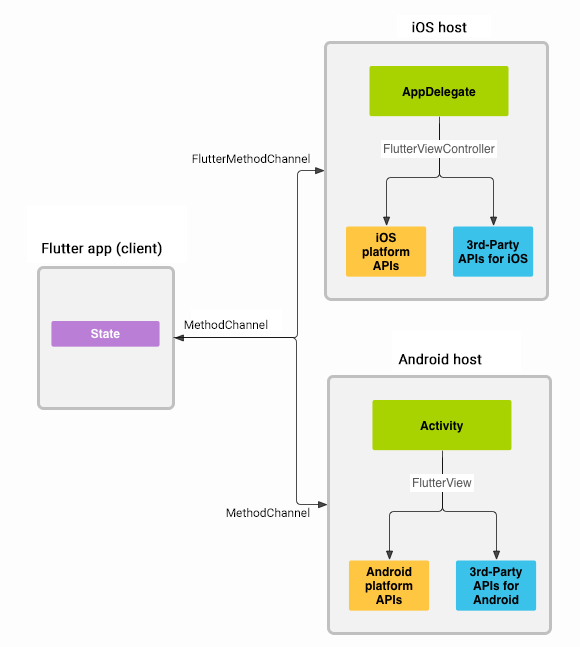
See the Flutter docs on MethodChannel: https://flutter.dev/docs/development/platform-integration/platform-channels
5.3 Opening Pages
The open function in flutter_boost.dart:
Future<Map<dynamic, dynamic>> open(String url,
      {Map<dynamic, dynamic> urlParams, Map<dynamic, dynamic> exts}) {
    Map<dynamic, dynamic> properties = new Map<dynamic, dynamic>();
    properties["url"] = url;
    properties["urlParams"] = urlParams;
    properties["exts"] = exts;
    return channel.invokeMethod<Map<dynamic, dynamic>>('openPage', properties);
  }
It packages up the arguments and sends an openPage message to Native. On the Android side, FlutterBoostPlugin.java handles incoming Dart messages:
class BoostMethodHandler implements MethodChannel.MethodCallHandler {

        @Override
        public void onMethodCall(MethodCall methodCall, final MethodChannel.Result result) {

            FlutterViewContainerManager mManager = (FlutterViewContainerManager) FlutterBoost.instance().containerManager();
            switch (methodCall.method) {
                case "openPage": {
                    try {
                        Map<String, Object> params = methodCall.argument("urlParams");
                        Map<String, Object> exts = methodCall.argument("exts");
                        String url = methodCall.argument("url");

                        mManager.openContainer(url, params, exts, new FlutterViewContainerManager.OnResult() {
                            @Override
                            public void onResult(Map<String, Object> rlt) {
                                if (result != null) {
                                    result.success(rlt);
                                }
                            }
                        });
                    } catch (Throwable t) {
                        result.error("open page error", t.getMessage(), t);
                    }
                }
                break;
                default: {
                    result.notImplemented();
                }
            }
        }
    }
When Android receives the openPage message, the container manager (FlutterViewContainerManager) opens a container based on the configuration from Dart. openContainer is an abstract method — the business layer implements it. Looking back at section 3.2, this is exactly what we implemented: the custom PageRouter class that ultimately calls context.startActivity().
That wraps up Android-side Flutter Boost integration for hybrid development. This post only scratches the surface of the source code — a more detailed analysis and iOS-side integration will come in a future post.
Appendix: Flutter Boost Integration on iOS
1. Overview
After integrating Flutter Boost on Android, let’s look at how to integrate it on iOS (using Objective-C). This section is a supplement to the Android post.
See the main post: Flutter Boost Hybrid Development: Practice and Source Code Walkthrough (Android). The Flutter Module is the same one we created there — directory structure and module setup remain unchanged.
2. Integration
2.1 Project Setup
Start with a blank project that has CocoaPods set up. In the Podfile, reference the Flutter Module:
flutter_application_path = '../flutter_module'
load File.join(flutter_application_path, '.ios', 'Flutter', 'podhelper.rb')

target 'FlutterHybridiOS' do
install_all_flutter_pods(flutter_application_path)
end
Run pod install from the project root. If these modules appear in your Pods, you’re good:
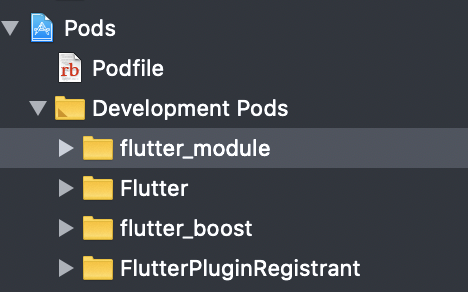
For CocoaPods basics, see the CocoaPods usage guide.
2.2 Implement the Router Class
Follow the official Flutter Boost example: https://github.com/alibaba/flutter_boost/blob/master/example/ios/Runner/PlatformRouterImp.h
PlatformRouterImp.h:
#import <Foundation/Foundation.h>
#import <UIKit/UIKit.h>
#import <flutter_boost/FlutterBoost.h>

NS_ASSUME_NONNULL_BEGIN

@protocol FLBPlatform;

/**
 * Implement native-side page opening and closing.
 * Recommended: use FlutterBoostPlugin's open/close methods rather than calling this directly.
 * FlutterBoostPlugin supports returning data when a page closes.
 */
@interface PlatformRouterImp : NSObject<FLBPlatform>
@property (nonatomic,strong) UINavigationController *navigationController;
@end

NS_ASSUME_NONNULL_ENDPlatformRouterImp.m:
#import "PlatformRouterImp.h"
#import <flutter_boost/FlutterBoost.h>

@interface PlatformRouterImp()
@end

@implementation PlatformRouterImp

#pragma mark - Boost 1.5
- (void)open:(NSString *)name
   urlParams:(NSDictionary *)params
        exts:(NSDictionary *)exts
  completion:(void (^)(BOOL))completion
{
    BOOL animated = [exts[@"animated"] boolValue];
    FLBFlutterViewContainer *vc = FLBFlutterViewContainer.new;
    [vc setName:name params:params];
    [self.navigationController pushViewController:vc animated:animated];
    if(completion) completion(YES);
}

- (void)present:(NSString *)name
   urlParams:(NSDictionary *)params
        exts:(NSDictionary *)exts
  completion:(void (^)(BOOL))completion
{
    BOOL animated = [exts[@"animated"] boolValue];
    FLBFlutterViewContainer *vc = FLBFlutterViewContainer.new;
    [vc setName:name params:params];
    [self.navigationController presentViewController:vc animated:animated completion:^{
        if(completion) completion(YES);
    }];
}

- (void)close:(NSString *)uid
       result:(NSDictionary *)result
         exts:(NSDictionary *)exts
   completion:(void (^)(BOOL))completion
{
    BOOL animated = [exts[@"animated"] boolValue];
    animated = YES;
    FLBFlutterViewContainer *vc = (id)self.navigationController.presentedViewController;
    if([vc isKindOfClass:FLBFlutterViewContainer.class] && [vc.uniqueIDString isEqual: uid]){
        [vc dismissViewControllerAnimated:animated completion:^{}];
    }else{
        [self.navigationController popViewControllerAnimated:animated];
    }
}
@end
Flutter Boost supports push, present, and pop.
2.3 Bind the Router
AppDelegate.h:
#import <UIKit/UIKit.h>
#import <flutter_boost/FlutterBoost.h>

@interface AppDelegate : UIResponder <UIApplicationDelegate>
@property (nullable, nonatomic, strong) UIWindow *window;
@endAppDelegate.m:
#import "AppDelegate.h"
#import "PlatformRouterImp.h"
#import <flutter_boost/FlutterBoost.h>

@implementation AppDelegate

- (BOOL)application:(UIApplication *)application didFinishLaunchingWithOptions:(NSDictionary *)launchOptions {

    PlatformRouterImp *router = [PlatformRouterImp new];
    [FlutterBoostPlugin.sharedInstance startFlutterWithPlatform:router
                                                        onStart:^(FlutterEngine *engine) {

                                                        }];
UITabBarController *tabVC = [[UITabBarController alloc] init];
UINavigationController *rvc = [[UINavigationController alloc] initWithRootViewController:tabVC];
    router.navigationController = rvc;

return YES;
}
3. Usage
- (void)openClick:(UIButton *)button
{
    [FlutterBoostPlugin open:@"first" urlParams:@{kPageCallBackId:@"MycallbackId#1"} exts:@{@"animated":@(YES)} onPageFinished:^(NSDictionary *result) {
        NSLog(@"call me when page finished, and your result is:%@", result);
    } completion:^(BOOL f) {
        NSLog(@"page is opened");
    }];
}

- (void)openPresentClick:(UIButton *)button
{
    [FlutterBoostPlugin open:@"second" urlParams:@{@"present":@(YES),kPageCallBackId:@"MycallbackId#2"} exts:@{@"animated":@(YES)} onPageFinished:^(NSDictionary *result) {
        NSLog(@"call me when page finished, and your result is:%@", result);
    } completion:^(BOOL f) {
        NSLog(@"page is presented");
    }];
}
You can open routes registered in the Flutter Module using both push and present from the native side.
Flutter Boost is now successfully integrated on iOS. Time to start building your hybrid app!
