A while back I built a fun terminal emulator page: http://ursb.me/terminal/ (desktop only — no mobile layout). It works as a personal blog system and doubles as a learning tool for Linux terminal commands. Sharing it here!
Open source: airingursb/terminal
0x01 Styling
The page looks like this when you open it:

The styling is directly copied from the Terminal app on my Mac. The hardware specs shown are made up — I can’t afford that kind of machine.
Note: The logo in the screenshot was printed using
archey. Install it on Mac withbrew install archey.
The command input is powered by a single input element:
<span class="prefix">[<span id='usr'>usr</span>@<span class="host">ursb.me</span> <span id="pos">~</span>]% </span>
<input type="text" class="input-text">
The default input styling is ugly, so we dress it up:
.input-text {
    display: inline-block;
    background-color: transparent;
    border: none;
    -moz-appearance: none;
    -webkit-appearance: none;
    outline: 0;
    box-sizing: border-box;
    font-size: 17px;
    font-family: Monaco, Cutive Mono, Courier New, Consolas, monospace;
    font-weight: 700;
    color: #fff;
    width: 300px;
    padding-block-end: 0
}
Since we’re emulating a terminal in the browser, the cursor should look like one too:
* {
    cursor: text;
}
0x02 Rendering Logic
Each new output appends to the existing HTML and re-renders. Rendering is triggered when the user presses Enter, so we listen for keydown. The render function is mainFunc, which takes the user’s input and current directory (maintained as a global variable used across many commands).
e_main.html($('#main').html() + '[<span id="usr">' + usrName + '</span>@<span class="host">ursb.me</span> ' + position + ']% ' + input + '<br/>Nice to Meet U : )<br/>')
e_html.animate({ scrollTop: $(document).height() }, 0)
After each render, a scroll animation moves to the bottom — making the experience feel more like a real terminal.
$(document).bind('keydown', function (b) {
  e_input.focus()
  if (b.keyCode === 13) {
    e_main.html($('#main').html())
    e_html.animate({ scrollTop: $(document).height() }, 0)
    mainFunc(e_input.val(), nowPosition)
    hisCommand.push(e_input.val())
    isInHis = 0
    e_input.val('')
  }

  // Ctrl + U to clear input
  if (b.keyCode === 85 && b.ctrlKey === true) {
    e_input.val('')
    e_input.focus()
  }
})
I also implemented Ctrl+U to clear the current input. Other shortcuts can be added the same way.
0x03 help
Linux commands follow the format command[ Options...]. To help users who might not know this, I implemented a simple help command:
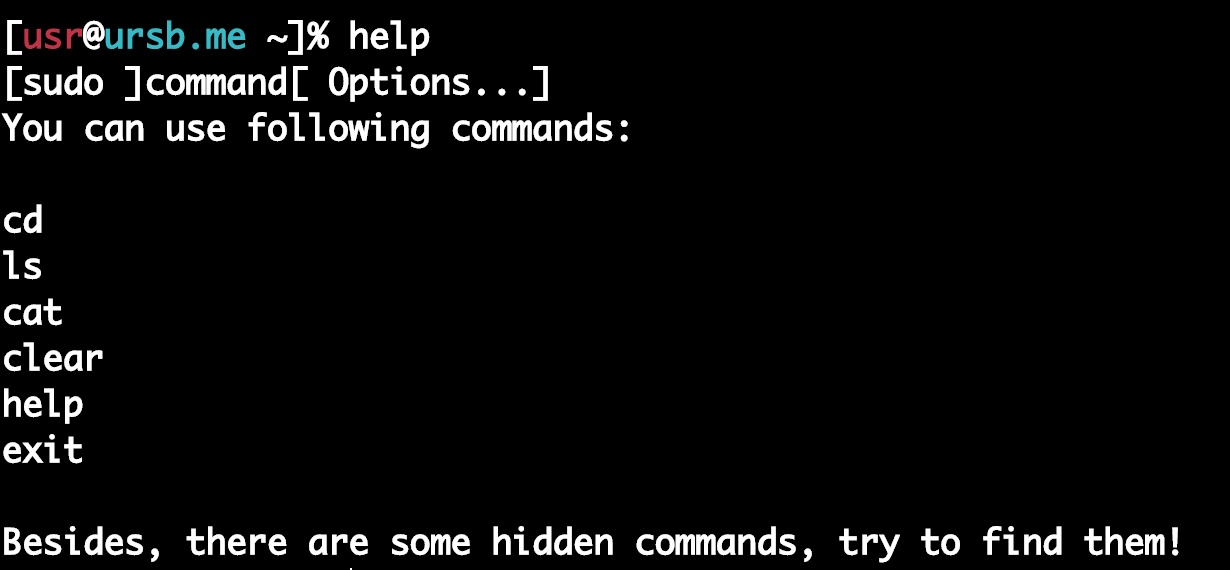
This is just a hardcoded string print — straightforward to implement:
switch (command) {
    case 'help':
      e_main.html($('#main').html() + '[<span id="usr">' + usrName + '</span>@<span class="host">ursb.me</span> ' + position + ']% ' + input + '<br/>' + '[sudo ]command[ Options...]<br/>You can use following commands:<br/><br/>cd<br/>ls<br/>cat<br/>clear<br/>help<br/>exit<br/><br/>Besides, there are some hidden commands, try to find them!<br/>')
      e_html.animate({ scrollTop: $(document).height() }, 0)
      break
}
The command is just the first word before the first space:
command = input.split(' ')[0]Knowing how to extract the command word, you can implement all sorts of print-based easter eggs. I’ll leave those for you to explore in the source code.
0x04 clear
clear empties the console. Based on our rendering logic, this just clears the inner HTML of the container div:
case 'clear':
  e_main.html('')
  e_html.animate({ scrollTop: $(document).height() }, 0)
  break
For a blog system, hardcoding everything in static HTML isn’t practical. When directory structure changes or you add new posts, you’d have to edit the HTML manually. That’s not realistic.
So I paired the frontend with a backend server that reads the actual directory and file structure, providing APIs to return the data.
Here’s what the server’s file structure looks like:

Now for the more interesting commands.
0x05 ls
The ls command lists the contents of the target directory. In Linux, it also color-codes output to distinguish file types.
Three things to implement:
- Know the user’s current location
- Fetch all files and directories in that location
- Distinguish files from directories to apply different styles
For point 1: the second parameter of mainFunc is always the current position — a global variable maintained by the cd command.
For point 2, the backend provides an API:
router.get('/ls', (req, res) => {
  let { dir } = req.query
  glob(`src/file${dir}**`, {}, (err, files) => {
    if (dir === '/') {
      files = files.map(i => i.replace('src/file/', ''))
      files = files.filter(i => !i.includes('/')) // filter out subdirectory contents
    } else {
      dir = dir.substring(1)
      files = files.map(i => i.replace('src/file/', '').replace(dir, ''))
      files = files.filter(i => !i.includes('/') && !i.includes(dir.substring(0, dir.length - 1))) // filter subdirectories and current dir
    }
    return res.jsonp({ code: 0, data: files.map(i => i.replace('src/file/', '').replace(dir, '')) })
  })
})
We use the glob library for file traversal. If the user is in the root, we filter out nested files (since ls only shows current directory contents). If in a subdirectory, we also strip out the current directory name from paths (since glob includes it).
The frontend then calls the API:
case 'ls':
$.ajax({
url: host + '/ls',
data: { dir: position.replace('~', '') + '/' },
dataType: 'jsonp',
success: (res) => {
if (res.code === 0) {
let data = res.data.map(i => {
if (!i.includes('.')) {
// directory
i = `<span class="ls-dir">${i}</span>`
}
return i
})
e_main.html($('#main').html() + '[<span id="usr">' + usrName + '</span>@<span class="host">ursb.me</span> ' + position + ']% ' + input + '<br/>' + data.join(' ') + '<br/>')
e_html.animate({ scrollTop: $(document).height() }, 0)
}
}
})
breakWe distinguish files from directories by checking for a . in the name and applying different styles to directories. This isn’t technically rigorous (directories can have . in their names too), but for a blog system it’s good enough.
Result:

0x06 cd
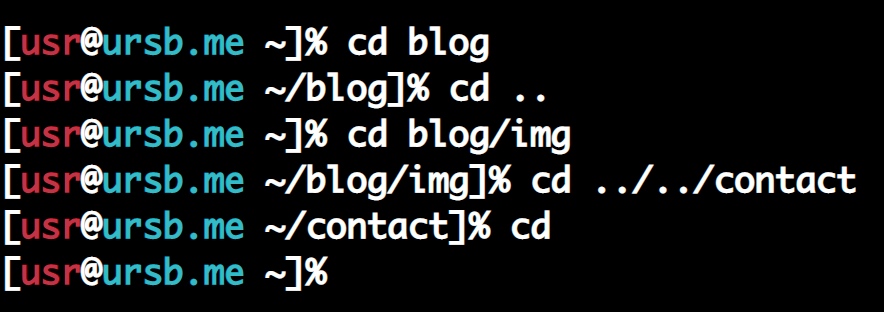
The backend API takes pos (current position) and dir (the directory to navigate to). It filters out files (since cd only works with directories), and returns a 404-style error code if the directory doesn’t exist. It doesn’t filter out subdirectories, since cd can navigate into nested paths.
router.get('/cd', (req, res) => {
  let { pos, dir } = req.query

  glob(`src/file${pos}**`, {}, (err, files) => {
    pos = pos.substring(1)
    files = files.filter(i => !i.includes('.')) // filter out files
    files = files.map(i => i.replace('src/file/', '').replace(pos, ''))
    dir = dir.substring(0, dir.length - 1)
    if (files.indexOf(dir) === -1) {
      return res.jsonp({ code: 404, message: 'cd: no such file or directory: ' + dir })
    } else {
      return res.jsonp({ code: 0 })
    }
  })
})
The frontend handles several cases:
- Return to home:
cd||cd ~||cd ~/ - Navigate elsewhere:
- From home:
cd ~/dir||cd ./dir||cd dir - From another dir:
cd ..||cd ../||cd ../dir||cd dir||cd ./dir- Absolute path:
cd ~/dir - Relative path deeper:
cd dir||cd ./dir||cd ../dir||cd ..||cd ../||cd ../../
- Absolute path:
- From home:
Case 1 is straightforward — just reset the current position to ~.
if (!input.split(' ')[1] || input.split(' ')[1] === '~' || input.split(' ')[1] === '~/') {
    nowPosition = '~'
    e_main.html($('#main').html() + '[<span id="usr">' + usrName + '</span>@<span class="host">ursb.me</span> ' + position + ']% ' + input + '<br/>')
    e_html.animate({ scrollTop: $(document).height() }, 0)
    e_pos.html(nowPosition)
}
For case 2, parsing differs depending on whether the user is in the home directory. Here’s the most complex sub-case (relative path navigation with ../):
let pos = '/' + nowPosition.replace('~/', '') + '/'
let backCount = input.split(' ')[1].match(/\.\.\//g) && input.split(' ')[1].match(/\.\.\//g).length || 0

pos = nowPosition.split('/') // [~, blog, img]
nowPosition = pos.slice(0, pos.length - backCount) // [~, blog]
nowPosition = nowPosition.join('/') // ~/blog

pos = '/' + nowPosition.replace('~', '').replace('/', '')  + '/'
dir = dir + '/'
dir = dir.startsWith('./') && dir.substring(1) || dir // handle: cd ./dir
$.ajax({
    url: host + '/cd',
    data: { dir, pos },
    dataType: 'jsonp',
    success: (res) => {
      if (res.code === 0) {
        nowPosition = '~' + pos.substring(1) + dir.substring(0, dir.length - 1) // ~/blog/img
        e_main.html($('#main').html() + '[<span id="usr">' + usrName + '</span>@<span class="host">ursb.me</span> ' + position + ']% ' + input + '<br/>')
        e_html.animate({ scrollTop: $(document).height() }, 0)
        e_pos.html(nowPosition)
      } else if (res.code === 404) {
        e_main.html($('#main').html() + '[<span id="usr">' + usrName + '</span>@<span class="host">ursb.me</span> ' + position + ']% ' + input + '<br/>' + res.message + '<br/>')
        e_html.animate({ scrollTop: $(document).height() }, 0)
      }
    }
})
The core is counting how many levels to go back (by counting ../ occurrences with regex), then computing the resulting path using array slicing and string joining.
Result:
0x07 cat
cat is essentially the same as cd, but for files instead of directories.
Backend API:
router.get('/cat', (req, res) => {
  let { filename, dir } = req.query

  // Handle nested paths: e.g., in ~/blog/img, cat banner/menu.md
  dir = (dir + filename).split('/')
  filename = dir.pop() // the last segment is always the file
  dir = dir.join('/') + '/'

  glob(`src/file${dir}*.md`, {}, (err, files) => {
    dir = dir.substring(1)
    files = files.map(i => i.replace('src/file/', '').replace(dir, ''))
    filename = filename.replace('./', '')

    if (files.indexOf(filename) === -1) {
      return res.jsonp({ code: 404, message: 'cat: no such file or directory: ' + filename })
    } else {
      fs.readFile(`src/file/${dir}/${filename}`, 'utf-8', (err, data) => {
        return res.jsonp({ code: 0, data })
      })
    }
  })
})
The path computation is handled server-side here, since the current position doesn’t change when using cat. If the file exists, its content is returned; otherwise, an error.
The frontend is simpler — no need to track the current position:
case 'cat':
  file = input.split(' ')[1]
  $.ajax({
    url: host + '/cat',
    data: { filename: file, dir: position.replace('~', '') + '/' },
    dataType: 'jsonp',
    success: (res) => {
      if (res.code === 0) {
        e_main.html($('#main').html() + '[<span id="usr">' + usrName + '</span>@<span class="host">ursb.me</span> ' + position + ']% ' + input + '<br/>' + res.data.replace(/\n/g, '<br/>') + '<br/>')
        e_html.animate({ scrollTop: $(document).height() }, 0)
      } else if (res.code === 404) {
        e_main.html($('#main').html() + '[<span id="usr">' + usrName + '</span>@<span class="host">ursb.me</span> ' + position + ']% ' + input + '<br/>' + res.message + '<br/>')
        e_html.animate({ scrollTop: $(document).height() }, 0)
      }
    }
  })
  break
Result:

0x08 Tab Autocomplete
Anyone who’s used a terminal knows that Tab autocomplete is one of the biggest efficiency wins — typing a few characters and letting the shell fill in the rest. Of course we need to implement this.
For autocomplete to work, the system needs to know what to complete to. Since our terminal only does file and directory reads, we store the full list of directories and files in two global variables, loaded when the page opens:
$(document).ready(() => {
  $.ajax({
    url: host + '/list',
    data: { dir: '/' },
    dataType: 'jsonp',
    success: (res) => {
      if (res.code === 0) {
        directory = res.data.directory
        directory.shift(); // remove the leading '~'
        files = res.data.files
      }
    }
  })
})
Backend API:
router.get('/list', (req, res) => {
  let { dir } = req.query
  glob(`src/file${dir}**`, {}, (err, files) => {
    if (dir === '/') {
      files = files.map(i => i.replace('src/file/', ''))
    }
    files[0] = '~' // set home directory
    let directory = files.filter(i => !i.includes('.')) // keep only directories
    files = files.filter(i => i.includes('.')) // keep only files

    // Sort files by depth (shallowest first) so the frontend matches the shortest path first
    files = files.sort((a, b) => {
      let deapA = a.match(/\//g) && a.match(/\//g).length || 0
      let deapB = b.match(/\//g) && b.match(/\//g).length || 0

      return deapA - deapB
    })

    return res.jsonp({ code: 0, data: {directory, files }})
  })
})
The resulting arrays:


Directories are sorted alphabetically (so cd autocomplete matches the shortest path), while files are sorted by depth (so cat autocomplete prioritizes files in the current directory).
We listen for the Tab key:
if (b.keyCode === 9) {
    pressTab(e_input.val())
    b.preventDefault()
    e_html.animate({ scrollTop: $(document).height() }, 0)
    e_input.focus()
  }
The pressTab function handles three cases (since only cat and cd take path arguments):
- Complete the command name
- Complete the argument for
cat - Complete the argument for
cd
Case 1 is a bit naive but charming:
command = input.split(' ')[0]
if (command === 'l') e_input.val('ls')
if (command === 'c') {
e_main.html($('#main').html() + '[<span id="usr">' + usrName + '</span>@<span class="host">ursb.me</span> ' + nowPosition + ']% ' + input + '<br/>cat cd claer<br/>')
}
if (command === 'ca') e_input.val('cat')
if (command === 'cl' || command === 'cle' || command === 'clea') e_input.val('clea')For case 2, cat autocomplete matches files and handles the ./ prefix:
if (input.split(' ')[1] && command === 'cat') {
    file = input.split(' ')[1]
    let pos = nowPosition.replace('~', '').replace('/', '') // strip leading ~ and ~/
    let prefix = ''

    if (file.startsWith('./')) {
        prefix = './'
        file = file.replace('./', '')
    }

    if (nowPosition === '~') {
        files.every(i => {
          if (i.startsWith(pos + file)) {
            e_input.val('cat ' + prefix + i)
            return false
          }
          return true
        })
    } else {
        pos = pos + '/'
        files.every(i => {
          if (i.startsWith(pos + file)) {
            e_input.val('cat ' + prefix + i.replace(pos, ''))
            return false
          }
          return true
        })
    }
}
Case 3 is similar but matches directories instead of files. I’ll omit it since it follows the same pattern.
0x09 Command History
Linux terminals let you navigate previous commands with the up/down arrow keys — a fundamental feature. Let’s implement it.
A few global variables:
let hisCommand = [] // command history
let cour = 0 // pointer
let isInHis = 0 // whether current input is from history (0 = no, 1 = yes)
isInHis tracks whether the user is currently browsing history. Even if the user has typed something but hasn’t pressed Enter yet, pressing Up and then Down should restore whatever they had typed — not clear it. (isInHis resets to 0 after Enter is pressed.)
Add arrow key listeners in the keydown handler:
if (b.keyCode === 38) historyCmd('up')
if (b.keyCode === 40) historyCmd('down')
The historyCmd function moves through the history based on direction:
let historyCmd = (k) => {
  $('body,html').animate({ scrollTop: $(document).height() }, 0)

  if (k !== 'up' || isInHis) {
    if (k === 'up' && isInHis) {
      if (cour >= 1) {
        cour--
        e_input.val(hisCommand[cour])
      }
    }
    if (k === 'down' && isInHis) {
      if (cour + 1 <= hisCommand.length - 1) {
        cour++
        $(".input-text").val(hisCommand[cour])
      } else if (cour + 1 === hisCommand.length) {
        $(".input-text").val(inputCache)
      }
    }
  } else {
    inputCache = e_input.val()
    e_input.val(hisCommand[hisCommand.length - 1])
    cour = hisCommand.length - 1
    isInHis = 1
  }
}
Simple logic: move an array pointer up or down through the history.
The code is open source at airingursb/terminal — contributions and PRs are welcome. Let’s build this into something even better together!
